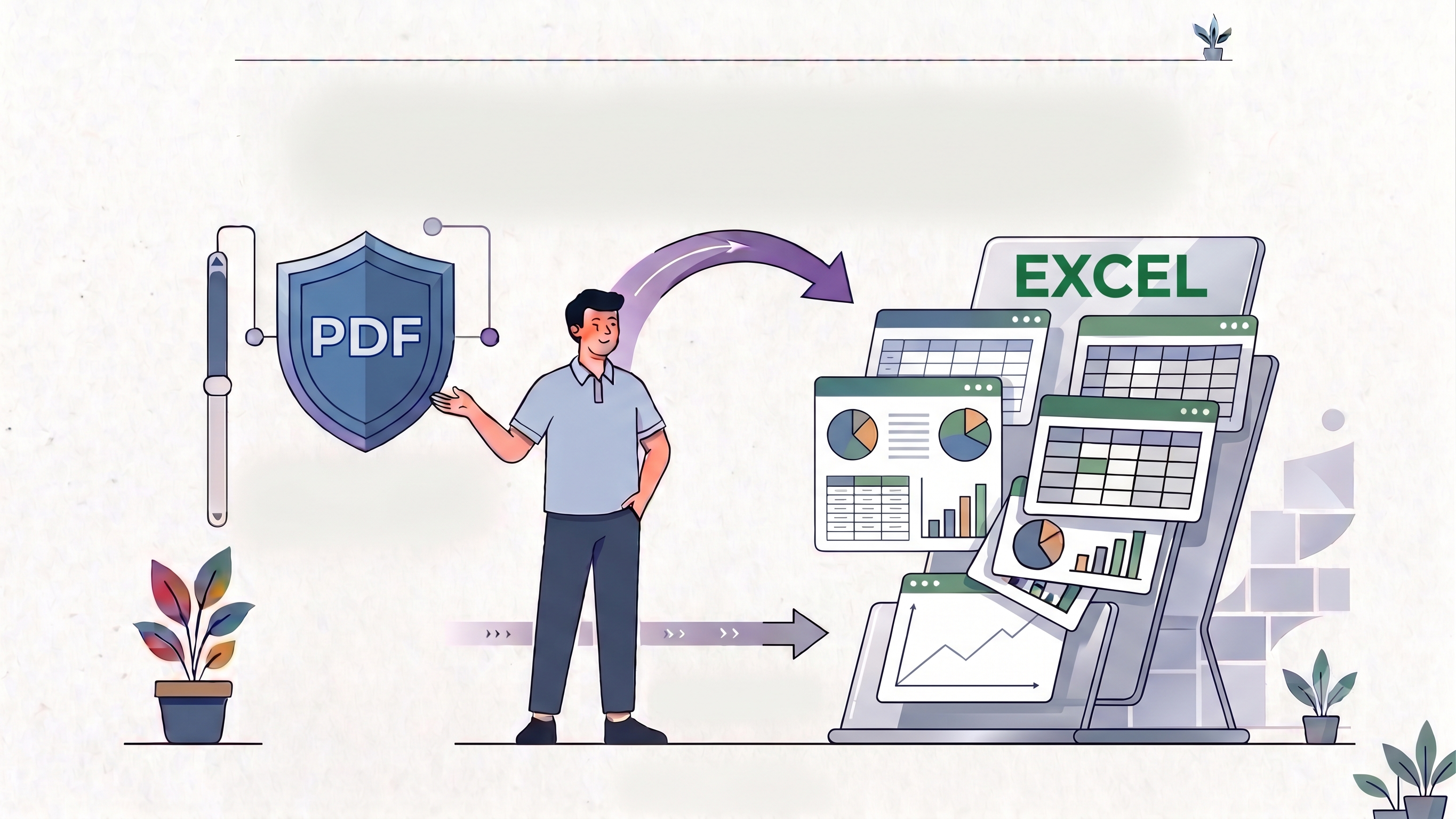
Of all the PDF conversions people attempt, PDF-to-Excel has the widest gap between expectation and reality. Someone uploads a PDF with a clean-looking financial table, clicks convert, and expects a perfect spreadsheet. What they often get is a mess — merged rows, split columns, numbers landing in the wrong cells, header text jumbled into the data.
This guide does three things most conversion guides don't:
- It explains why tables break, with a citation to the actual PDF specification — not just "trust us."
- It walks through the tool end to end with real screenshots from an actual run, at three tiers of difficulty — a clean table, a moderately hard one, and a multi-page one — rather than a generic description of how it's supposed to work.
- It's transparent about where PDF Doctor's converter is the right tool, and where a different tool will genuinely serve you better.
What Actually Happens When You Convert a PDF to Excel
This is worth understanding before you convert anything, because it explains almost every problem you'll encounter.
A PDF does not store tables. Structurally, per the ISO 32000 specification that defines the PDF format, a page is a content stream of drawing operators — each one positions and renders a character or string at specific coordinates. Recovering meaning from that — this is text, that is a table, this cell belongs under that header — is a separate, best-effort reconstruction step, not something the file format records directly. Independent technical analyses of PDF text extraction describe this as PDF's "dual-path problem": the visual rendering path and the text/structure-recovery path are handled separately, and only the first one is guaranteed by the format. When you look at a table in a PDF, what you're actually seeing is dozens of individually placed text strings that happen to be aligned in rows and columns, sometimes with lines drawn between them for visual separation. The PDF format has no built-in concept of "this is row 3, column B."
When a conversion tool builds an Excel spreadsheet from a PDF, it has to:
- detect where tables exist on the page,
- infer the row and column structure by analyzing the spacing and alignment of text fragments,
- assign each text fragment to the correct cell, and
- handle merged cells, multi-line cell content, and headers.
This is pattern recognition applied to a document that was never given explicit structure — not a lookup of data that already exists in rows and columns. That's why simple, well-bordered tables with consistent spacing convert reliably, while complex tables with merged cells, irregular spacing, or no visible borders frequently don't. The tool isn't failing; it's reconstructing structure from a format that doesn't store it.
Sources: ISO 32000-2 (PDF 2.0), PDF Association; PDF dual-path extraction problem, as described in recent document-processing research on arXiv.
How to Convert a PDF to Excel With PDF Doctor (Free, No Account Required)
We walked through this process ourselves, so every screenshot below reflects an actual run of the tool rather than a description of how it's supposed to work.
Step 1: Open the Conversion Tool
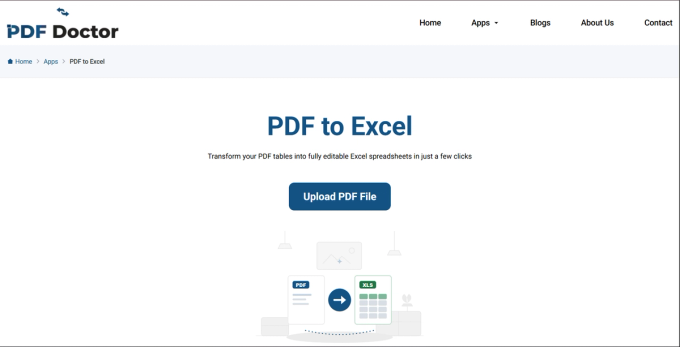
Go to pdfsdoctor.com/pdf-to-excel. The interface loads a single upload area. No sign-up, no payment, no software to install. Works on Chrome, Firefox, Safari, and Edge, on desktop and mobile.
Step 2: Upload Your PDF
Click Upload PDF File and select the document you want to convert. The tool loads the file and lists it, ready to convert.
Before uploading, ask yourself two questions:
- Is this a text-based PDF or a scanned document? If you cannot highlight and copy text from the PDF, it's scanned — you'll need to run OCR on it first, or the output will be empty or garbled.
- Does the table have clear, consistent structure? If yes, expect a clean result. If the table has irregular merged cells, columns of varying widths, or no visible borders, expect some manual cleanup after conversion.
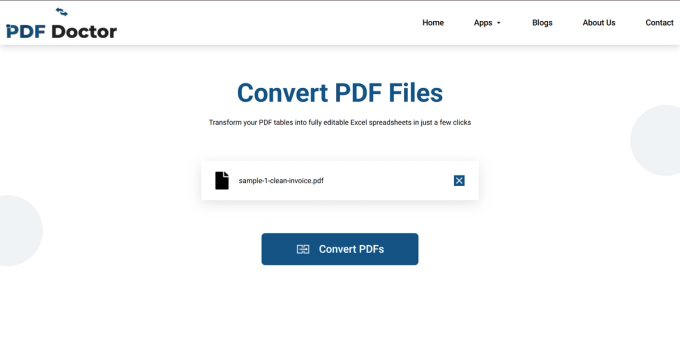
Step 3: Convert the File
Click Convert PDFs. The tool analyzes the document structure and generates an Excel spreadsheet. For standard-sized files, this typically takes a few seconds; larger documents with many tables may take longer.
Step 4: Download and Review
Click Download Excel File, then open it and review the output before using it.
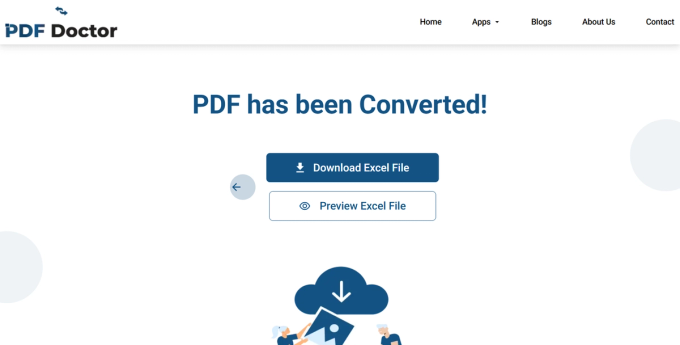
This review step matters more for PDF-to-Excel than for any other conversion, because table structure is where the most errors occur. Specifically check that:
- columns are aligned correctly (data from column A hasn't drifted into column B),
- row boundaries match the original (multi-line cell content sometimes splits into multiple rows),
- numbers are formatted as numbers, not text (this affects formulas), and
- header rows are intact and in the right position.
This isn't a formality. Independent, peer-reviewed research on spreadsheet accuracy — most notably the body of work by Prof. Raymond Panko (University of Hawaiʻi), who reviewed over a dozen field studies of real-world spreadsheets — has repeatedly found that roughly 9 out of 10 spreadsheets in active use contain at least one error, with average per-cell error rates in the low single digits. Spreadsheets that start from a manual or automated data-entry step (which is exactly what a PDF conversion is) are no exception to this. A five-minute review after conversion catches problems that would otherwise silently corrupt downstream analysis or calculations.
Source: Panko, R. (2015), "What We Don't Know About Spreadsheet Errors Today," EuSpRIG — summarizing 14 laboratory studies (n=967) with an average cell error rate of 3.9%, and field-audit data showing errors in the large majority of spreadsheets reviewed.
A Note on Privacy
Uploaded files are automatically deleted from our servers after processing and are not stored or shared. That said, if you're working with confidential financial data, client records, or documents under regulatory compliance requirements, and your organization requires files to never leave your local machine, a desktop tool that processes entirely offline is the safer choice. For everyday conversions, browser-based processing is a practical and secure option.
What Converts Well — and What Does Not
Being honest about this upfront saves you time and frustration.
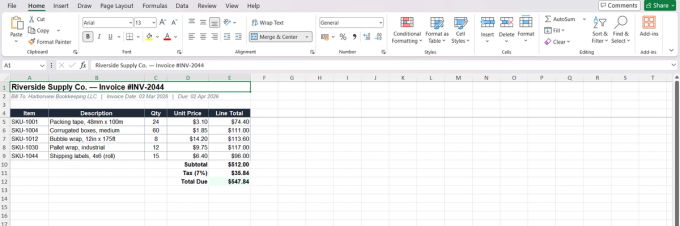
Converts well: Simple, clearly structured tables with visible borders, consistent column widths, single-line cell content, and a clear header row. Think basic financial statements, straightforward invoices, simple data exports, and reports generated from database applications — the invoice example above is a good case of this.
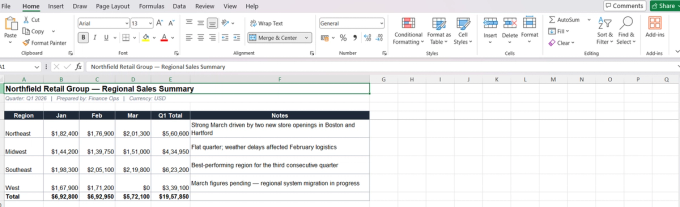
Converts with some cleanup needed: Tables with occasional merged cells, multi-line content within cells, or mixed text-and-number columns. The structure will mostly survive, but expect to fix a few cells manually — check that a merged header didn't collapse into a single unlabeled column, and that multi-line note text landed in one cell per row rather than spilling into extra rows.
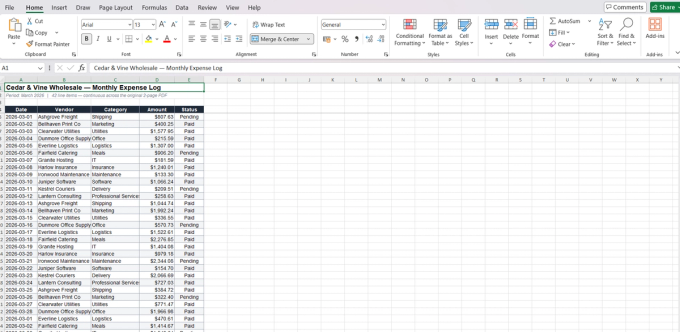
Watch for continuity issues: When a table spans multiple PDF pages, some tools restart the header on each page instead of treating it as one continuous table. Open the converted file and confirm all rows appear in one unbroken sequence, with the header appearing only once.
Converts poorly or not at all: Complex tables with heavy merging, nested tables (a table inside a table), tables without visible borders that rely purely on spacing, multi-column page layouts where the tool can't distinguish separate tables from one wide table, and PDFs where the "table" is actually an image. Design-heavy documents like infographics also fall into this category.
Will not work without OCR: Scanned documents. If the PDF is a photograph of a page rather than text-based content, the conversion tool has no text to extract. Run the file through an OCR tool first — Adobe Acrobat, ABBYY FineReader, or the free open-source OCRmyPDF — then convert the OCR-processed version.
When PDF-to-Excel Conversion Makes Sense
Extracting financial data from reports. A quarterly report, budget summary, or financial statement arrives as a PDF, and the numbers need to go into a spreadsheet for analysis or further calculation.
Processing invoices. If you receive invoices as PDFs and need to log line items for bookkeeping or expense tracking, conversion handles this efficiently — provided the invoices have consistent, simple table structures.
Working with government or institutional data. Public agencies frequently publish statistical data, census information, and regulatory filings as PDFs. Converting these to Excel makes the data sortable, filterable, and ready for analysis.
Pulling data from research papers. Academic and industry papers often include data tables that researchers need in their own analysis.
Migrating legacy data. Older records stored as PDFs — sales logs, inventory lists, contact databases — can be converted to bring them into modern workflows.
When PDF-to-Excel Is the Wrong Approach
If the PDF contains no tabular data — converting a text-heavy PDF (a contract, an essay) to Excel produces a messy, unusable spreadsheet. Use PDF-to-Word instead.
If you need a pixel-perfect replica of the table layout — conversion rearranges data into Excel's grid format, which may look different from the original PDF. If visual fidelity matters more than editability, keep the PDF.
If the data is in an image or chart — bar charts, pie charts, and graphs embedded in a PDF are images, not data. Conversion won't extract numbers from a chart.
If the table is extremely complex — nested tables, heavy merging, and irregular structures may need more manual cleanup than they save. In those cases, it may genuinely be faster to enter the data manually or use a tool like Tabula (free, open-source, built specifically for extracting tables from PDFs).
If the PDF is scanned and you haven't run OCR — the output will be empty or garbled.
Where PDF Doctor's Tool Fits — and Where a Different Tool Is a Better Choice
We'd rather point you to the right tool than have you struggle with ours for something it wasn't built for.
Our tool is built for: converting text-based PDFs with clearly structured tables into editable Excel spreadsheets, quickly and for free in a browser. Simple invoices, basic financial reports, and clean data tables are the sweet spot.
Where other tools are a better fit:
- Adobe Acrobat — better accuracy on complex, irregular table structures and heavy merging.
- Tabula (free, open-source, desktop) — lets you visually select the exact table region to extract; strong for research and one-off data work.
- tabula-py / camelot (Python libraries) — programmatic extraction with fine-grained control, for processing many PDFs at scale.
- LibreOffice — full offline processing when files can't leave your machine for compliance reasons.
Common Conversion Mistakes and How to Avoid Them
Not checking whether the PDF is scanned or text-based. Try to select text in the PDF. If you can highlight individual numbers and words, it's text-based and ready to convert. If not, it needs OCR first.
Assuming the Excel output is accurate without reviewing it. As the Panko research cited above shows, spreadsheets — including ones built by hand from scratch, by experienced people — carry errors at a surprisingly consistent rate. A converted spreadsheet is not exempt from that. Always review the output, especially the first and last rows of each table, before building anything on top of it.
Converting a PDF with no tables and expecting usable data. If the PDF is mostly body text with no tabular structure, the Excel output will be a mess of text fragments scattered across cells. That's a PDF-to-Word task.
Not checking number formatting. Conversion tools sometimes output numbers as text strings, which means Excel formulas like SUM and AVERAGE will ignore them. If your totals come out to zero, select the column and check whether Excel recognizes the values as numbers — you may need "Text to Columns" or "Convert to Number."
Trying to convert a multi-page table without verifying continuity. If a table spans multiple PDF pages, check that the Excel output kept the correct row sequence across the page break, and that the header wasn't duplicated in the middle of the data.
Tips for the Best Results
Start with the highlight test to confirm your PDF is text-based. After conversion, check column alignment and number formatting first — these are the most common failure points. If your table spans multiple pages, verify the rows continued correctly across page breaks. Keep the original PDF open alongside the Excel file during review so you can spot discrepancies quickly. For complex tables, consider Tabula as an alternative.
Wrapping Up
PDF-to-Excel conversion is a genuine time-saver for tabular data locked inside a PDF — financial reports, invoices, data tables, and structured records all benefit from living in a spreadsheet where you can sort, filter, and calculate.
The key to getting good results is knowing what to expect: simple, well-structured tables convert cleanly, while complex layouts need manual cleanup. Always check whether your file is scanned or text-based before converting, always review the output before using it, and match the tool to the complexity of the task.
The conversion tool used in this guide is available at pdfsdoctor.com/pdf-to-excel.
Materials Used in This Guide
For full transparency, here's everything referenced or used to produce this guide:
Tool tested: PDF Doctor's PDF-to-Excel converter — pdfsdoctor.com/pdf-to-excel
Test files used (three difficulty tiers):
- A simple bordered invoice — single header row, consistent columns, no merged cells
- A regional sales report with a merged two-row header and multi-line note cells
- A 42-row expense log spanning two PDF pages, to test row continuity across the page break
Alternative tools mentioned: Adobe Acrobat, Tabula, tabula-py, camelot, LibreOffice, OCRmyPDF, ABBYY FineReader
Sources cited:
- ISO 32000-2:2020 (PDF 2.0 specification) — PDF Association
- PDF dual-path text extraction problem — arXiv:2606.15020
- Panko, R., "What We Don't Know About Spreadsheet Errors Today," EuSpRIG 2015 — arXiv:1602.02601