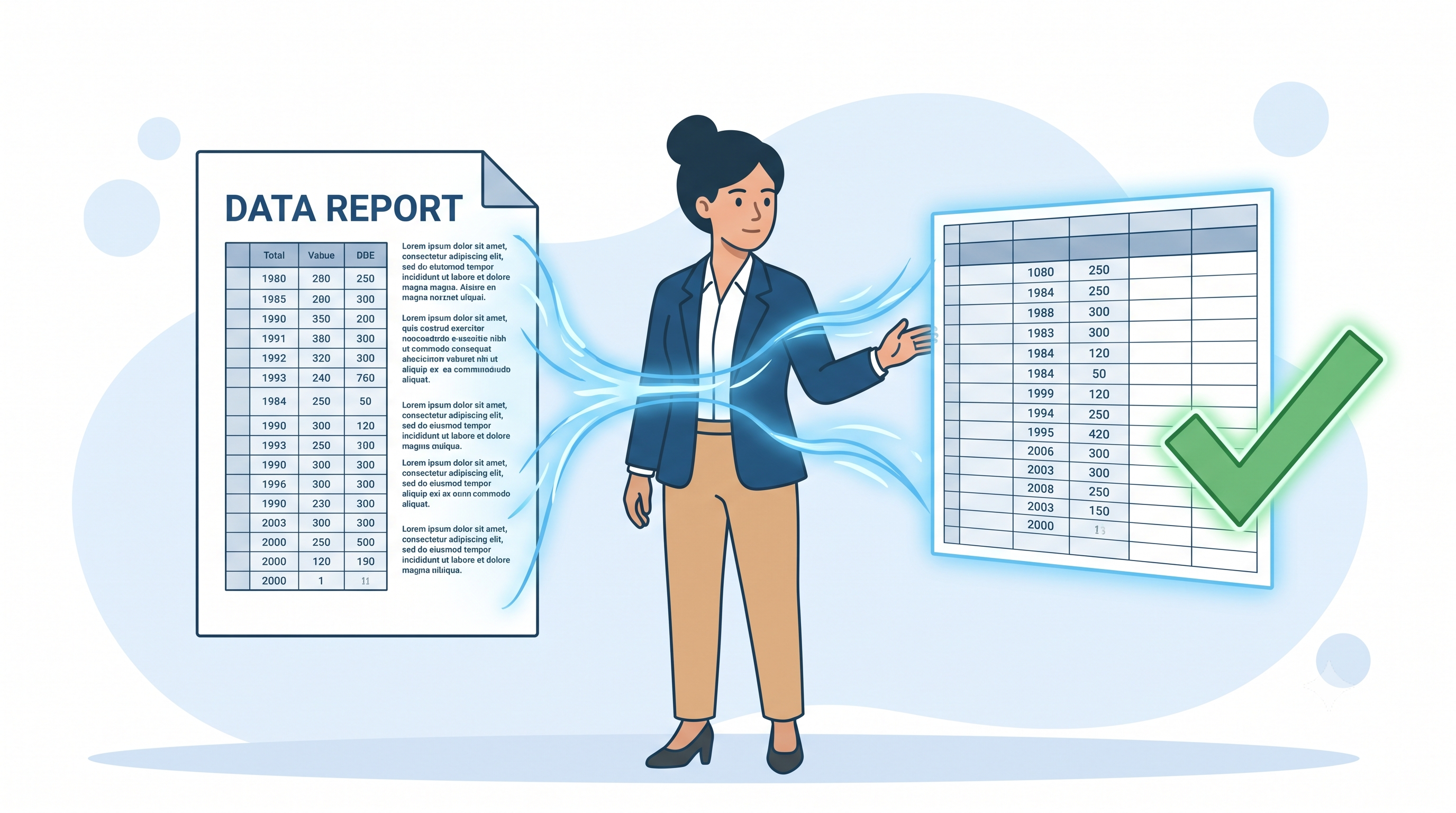
We built five test PDFs, ran them through six open-source extraction methods, and scored every cell against a known answer key. Here's what broke and how to catch it.
Key takeaways
- The table type matters more than the tool. On our bordered table, five of six methods got 90–100% of cells right. On the borderless version, the three line-based methods found nothing at all.
- The most dangerous errors look fine. A merged-cell table came out as a full grid of plausible numbers, with one row silently shifted one column to the left.
- With scanned PDFs, the method matters more than the OCR engine. The same Tesseract engine scored 13% when we OCR'd the whole page and 100% when we detected the grid first and read each cell separately.
- Every multi-page extraction needs one cleanup step. Five of six methods pasted the page-2 header into the middle of the data.
- Validation isn't optional. A 9-point checklist caught every error we found. For five of the six error types, the checks can be scripted; the sixth needs a quick SUM check in Excel.
Why we ran this test
The earlier version of this guide described common extraction errors in general terms. Readers asked a fair question: how often do these errors actually happen, and with which tools? So we tested it.
Table extraction is a data-integrity problem that looks like a copy-paste task. Even people extracting data by hand make frequent mistakes. A methodological review of systematic-review research found data-extraction error rates of up to 50% in the studies it examined, and those errors often changed the final results (Mathes, Klaßen & Pieper, 2017). Automated tools fail in different ways from humans. The fix for both is the same: check the output against the source before you trust it.
How we tested
We wanted results anyone could reproduce, so we used synthetic data with a known correct answer.
- We built five test PDFs with a Python script, one for each common table type (shown below). All the figures are invented for a fictional company, "Northwind Analytics." Each PDF has a matching ground-truth CSV, the exact table an analyst would want to end up with.
- We ran each PDF through six configurations of three widely used open-source libraries: pdfplumber 0.11.9 (lines and text strategies), Camelot 1.0.9 (lattice and stream modes), and tabula-py 2.10.0 (lattice and stream modes, on OpenJDK 21). For the scanned file, we also tested OCR pipelines built on Tesseract 5.3.4 and OpenCV 4.13.
- We scored every output cell by cell. A cell counts as correct only if the right value lands in the right row and column. Leading title rows are ignored, since you would simply delete them. We also recorded value recall: whether each value appears anywhere in the output, even in the wrong place. The gap between the two numbers is what reveals shifted and misplaced data.
- We ran a control test whenever we saw a surprising failure, to confirm the cause rather than guess at it.
Everything ran on Ubuntu 24.04 with Python 3.
Why PDF tables are harder to extract than they look
A PDF doesn't store tables. The PDF specification (ISO 32000-2) describes pages as content streams: instructions to draw text at given coordinates and to draw lines and filled shapes. There is no "row" or "column" object in the file. When we inspected our bordered test table with pdfplumber, it found 68 separate text objects, each with its own position.
To rebuild a table, a tool has to infer structure. It can do this in two ways:
- Lattice (line-based) methods find the drawn ruling lines and treat the spaces between them as cells. pdfplumber's "lines" strategy reads the vector line objects directly from the file. Camelot's lattice mode renders the page as an image and detects the lines visually. That difference matters, as Real error #1 shows.
- Stream (text-based) methods have no lines to work with, so they group words into columns based on the gaps between them.
Table structure recognition is still an active research area. Large benchmarks such as PubTables-1M (Smock, Pesala & Abraham, 2022) and the ICDAR table competitions (Göbel et al., 2013) exist because no single approach handles every layout.
The five table types we tested
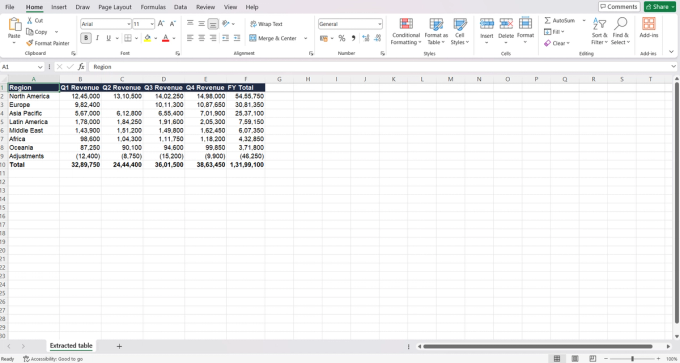
For each type below, the first image is the test PDF and the second is the final extraction opened in Excel. The Excel screenshots were taken on a computer set to Indian number formatting, so 1,245,000 displays as 12,45,000. The values are identical; only the digit grouping differs.
1. Bordered table (digital text)
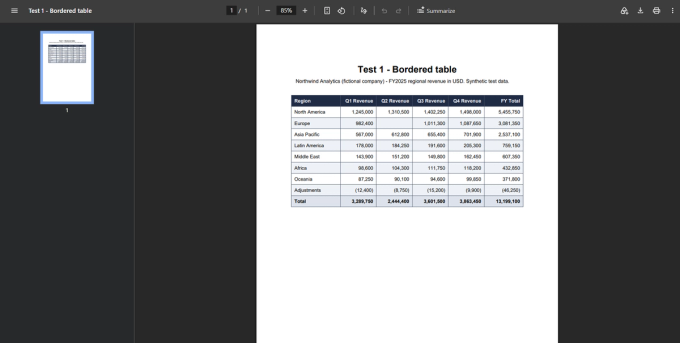
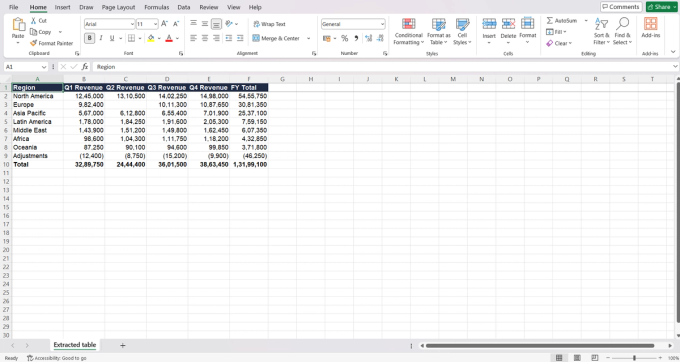
This is the best case. Result: pdfplumber (lines), Camelot stream, and both tabula-py modes scored 100%. Camelot lattice scored 90% because of one specific header problem, explained in Real error #1.
2. Borderless table (digital text)
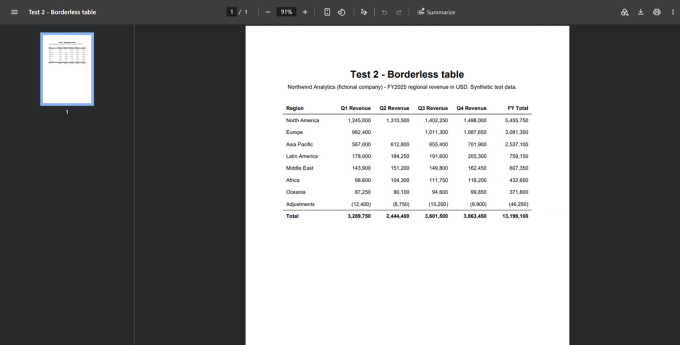
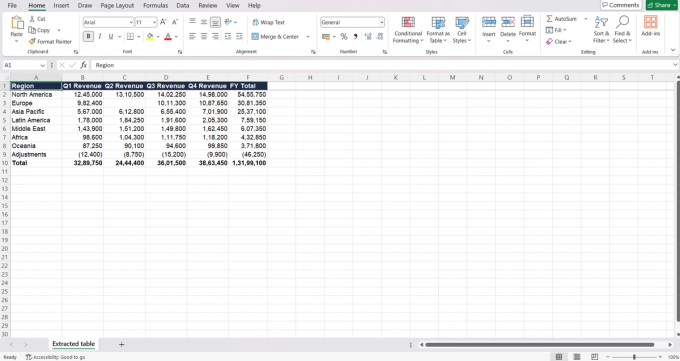
Result: all three line-based methods returned nothing. There are no lines to find. Camelot stream and tabula-py stream scored 100%. pdfplumber's text strategy scored 92%, but it pulled the page title into the table (Real error #2).
The lesson: if a tool returns an empty result on a borderless table, switch modes before you decide the file is broken.
3. Scanned table (image only)
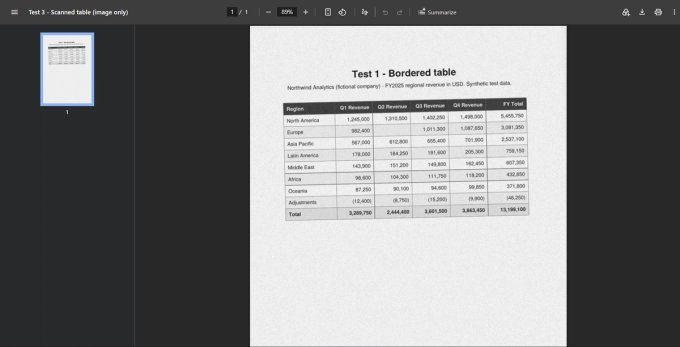
Result: every text-based tool scored 0%, because the PDF contains no text. OCR is required first, and how you run it made a huge difference (Real error #3).
4. Multi-page table
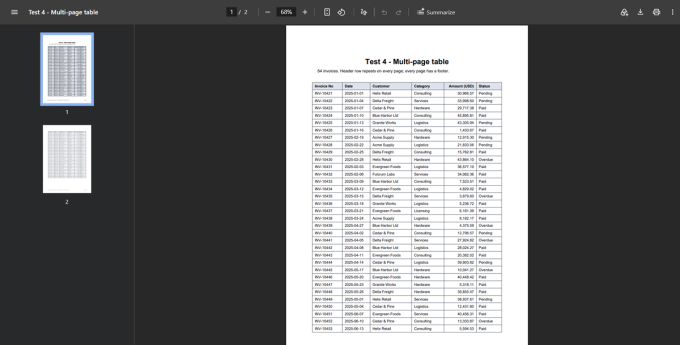
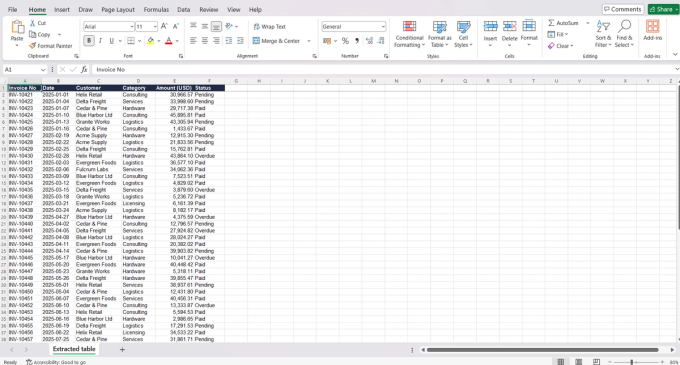
Result: five of six methods captured 100% of the values somewhere in their output. But five of six also inserted the page-2 header as a data row, which shifted every row after it (Real error #4). That's why the positional scores drop to 59%. After deleting the duplicate header (one line of code, shown below), the output matched the ground truth exactly: 64 rows and the same grand total.
5. Merged cells and a two-level header
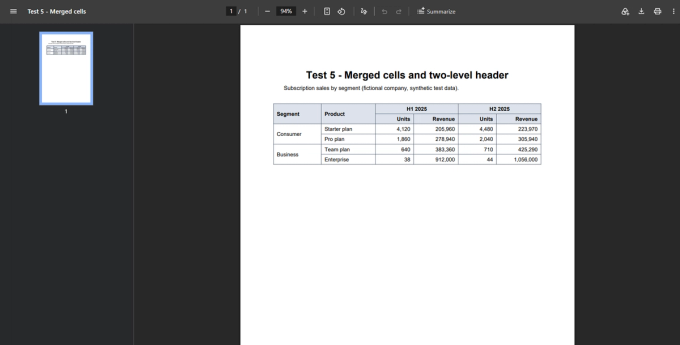
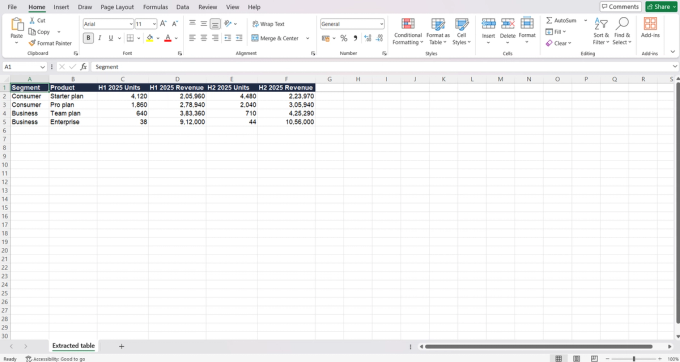
Result: no tool produced an analysis-ready table on its own. The two-level header always needs flattening ("H1 2025" + "Units" → "H1 2025 Units"), and merged row labels need to be filled down. The best raw outputs (pdfplumber lines and Camelot lattice) preserved the structure correctly, so the cleanup was mechanical. tabula-py lattice produced a silent column shift (Real error #5).
Six real errors, with the fix for each
Errors #1–#5 are actual tool output from our test run. Error #6 we reproduced in a demo workbook.
Real error #1: the whole header row lands in one cell
What happened: Camelot's lattice mode detects grid lines visually. On Test 1, dark-grey grid lines sit on a dark navy header fill, so in that row there is almost no contrast to detect. Camelot saw one wide cell and put every header into A1.
How we confirmed it: we rebuilt the same table with a light header fill and changed nothing else. Camelot then extracted all six headers correctly. pdfplumber (lines) handled the dark header fine, because it reads the vector lines from the file instead of looking at pixels.
Fix: if the header row has blank cells, look at row 1 before anything else. Try a second tool, or set the headers manually.
Real error #2: title rows pulled in, words split, headers shifted
What happened: pdfplumber's text strategy built columns from word gaps across the whole page. The title and subtitle became data rows, cut mid-word ("Borderle" | "ss table"). The header words also split at the wrong boundaries: "Region Q1", "Revenue Q2", and so on. All the numbers were correct, which makes this easy to accept without a second look.
Fix: crop to the table area before extracting. Tabula lets you draw a selection box, and pdfplumber and Camelot accept an area or region setting. Then check that each header reads as one complete label.
Real error #3: with OCR, the method matters more than the engine
What happened: we ran the same engine (Tesseract 5.3.4) on the same scan in two ways.
- Whole page first: we deskewed and denoised the scan, OCR'd the full page into a searchable PDF, then ran table detection. Only 13% of cells were correct. Grid lines were read as |, _ and ~. Neighbouring numbers fused together ("1,245,000 1,310,500"). 759,150 became "750,150." and two whole rows turned into noise.
- Grid first: we detected the ruling lines with OpenCV, cropped each cell, and OCR'd each crop on its own. 59 of 60 cells were correct. The one miss was the empty Europe/Q2 cell, where scan noise was read as "nil, ae". Adding a simple "is this cell nearly empty?" ink check before OCR brought it to 60 of 60.
Fix: for scans with visible grid lines, detect cells first and then OCR each one. Straighten and clean the scan beforehand. Treat empty cells as a known risk. Tools such as Adobe Acrobat and ABBYY FineReader combine OCR with table detection. Whatever you use, run the validation checks afterwards.
Caveat: the ink-check threshold was tuned on this one scan. Expect to adjust it for yours.
Real error #4: the page-2 header becomes a data row
What happened: tables that repeat their header on each page produce a header row in the middle of the data. One text row inside a number column is enough to break pivot tables, or to make Excel treat the whole column as text.
Fix: delete any row that exactly matches the header. In pandas that is one line (see the code below). In Excel, filter the first column for its header text and delete the matching rows.
Real error #5: merged cells cause a silent column shift
What happened: tabula-py dropped the empty merged cell in front of "Enterprise". Every value in that row slid one column to the left: 38 units landed in the Product column, and revenue landed under Units. The header shifted too, so "H2 2025" ended up above H1's Revenue column. The grid still looks complete.
Fix: check that each column holds a single data type. A number in a text column, or text in a number column, almost always means a shift. Check 7 in the checklist below catches this.
Real error #6: numbers stored as text
What happened: extraction tools often return numbers as text strings, especially when they include thousands separators or accounting-style negatives like (12,400). In our demo workbook, =SUM() over those cells returned 0, with no warning. (We recalculated in LibreOffice 24.2. Excel's SUM also ignores text in a range.)
Fix: in Excel, the "Convert to Number" option handles simple cases. For accounting negatives, use one formula:
Choosing a method
Manual copy-paste is fine for a handful of cells. Beyond that, it's the slowest option and the most likely to introduce errors.
Browser tools (PDF Doctor, iLovePDF, Smallpdf) are the fastest option for one-off digital PDFs with simple layouts. Before you upload financial, medical, or client data to any online tool, read Is It Safe to Upload Sensitive PDFs Online?
Excel Power Query (Data → Get Data → From File → From PDF) is built into Excel for Microsoft 365. It lists each table it detects and lets you clean the data in the Power Query editor. Microsoft documents it as the PDF connector, and it can combine many PDFs through the Folder connector. It isn't available in every Excel edition (Mac support has historically lagged), so check yours.
Tabula (free desktop app) lets you draw a box around exactly the region you want. That's the simplest fix for Real error #2.
Python is best for batches, or whenever you need the same cleanup every time. Pick the mode that matches the table: lattice for ruled tables, stream for borderless ones. This snippet is tested on our multi-page file. It returns all 64 rows with a grand total that matches the ground truth:
The post-extraction validation checklist
Run these checks every time, in this order. Each one caught at least one real error in our test.
- Column count and header cells. Does the output have the same number of columns as the PDF, and does every header cell contain a complete label? (Caught Real errors #1 and #2.)
- Row count. Count the data rows and compare against the PDF. Extra rows usually mean titles or repeated headers. Missing rows usually mean a page break. (Caught #2 and #4.)
- Duplicate headers. Search the data for the header text. (Caught #4.)
- Page furniture. Look for footers, page numbers, and titles sitting in data rows.
- Numbers as text. Run a SUM on each number column. A result of 0, or one that's too small, means some values are stored as text. (Caught #6.)
- OCR look-alikes. For scans, look for l/1, O/0, and S/5 swaps, and for a period where a comma belongs (99.850). (Caught #3.)
- Column types. Every column should hold one kind of data. An outlier usually means a shift. (Caught #5.)
- Totals. If the PDF has a total row, reconcile each column against it. This is the single most powerful check.
- Blanks. List every empty cell and confirm it's also empty in the PDF.
For critical data (financial, research, regulatory), also spot-check at least 10% of values against the source, including the first row, the last row, and any row next to a page break.
Limitations of this test
We want you to know exactly how far these results go:
- The test uses five synthetic files, not a large real-world corpus. Real documents are messier. Treat our scores as illustrations of how each method fails, not as general accuracy rates.
- We tested default settings for each tool. Most tools have options (areas, column hints, line scale) that can fix specific failures.
- The scanned file is one degraded scan of one table, and our OCR pipeline was built for tables with visible grid lines.
- Browser tools, Power Query, commercial OCR, and AI tools are not yet in the scored benchmark.
FAQ
What is the most accurate way to extract a table from a PDF? It depends on the table. In our test, lattice methods were perfect on bordered tables but found nothing on borderless ones, and stream methods were the reverse. Identify the table type first, then choose the method.
Why does Excel show 0 when I SUM my extracted numbers? The values are stored as text. Excel's SUM skips text without warning. Convert the values to numbers first (see Real error #6).
Can I extract a table from a scanned PDF? Yes, but you need OCR first. For tables with grid lines, detecting the cells and OCR'ing each one separately was far more accurate in our test than OCR'ing the whole page.
How do I extract a table that spans several pages? Extract all pages together, delete any row that repeats the header, and remove footer rows. Then check that the row count matches the PDF.
What changed in this update
24 Sep 2026: Replaced the illustrative examples with a reproducible benchmark (5 test PDFs, 6 methods, cell-level scoring). Added the OCR pipeline comparison, the dark-header control test, Excel Power Query, AI-tool guidance, a tested Python example, a 9-point validation checklist, and a limitations section. Corrected a mis-cited reference and replaced references we couldn't verify with primary sources.
References
- Göbel, M., Hassan, T., Oro, E., & Orsi, G. (2013). ICDAR 2013 Table Competition. Proceedings of the 12th International Conference on Document Analysis and Recognition, 1449–1453.
- International Organization for Standardization. (2020). ISO 32000-2:2020 Document management — Portable document format — Part 2: PDF 2.0.
- Mathes, T., Klaßen, P., & Pieper, D. (2017). Frequency of data extraction errors and methods to increase data extraction quality: a methodological review. BMC Medical Research Methodology, 17, 152. https://doi.org/10.1186/s12874-017-0431-4
- Microsoft. (n.d.). PDF connector — Power Query. Microsoft Learn. https://learn.microsoft.com/en-us/power-query/connectors/pdf
- Smock, B., Pesala, R., & Abraham, R. (2022). PubTables-1M: Towards comprehensive table extraction from unstructured documents. Proceedings of the IEEE/CVF Conference on Computer Vision and Pattern Recognition (CVPR).
- Software documentation: Camelot (camelot-py.readthedocs.io), pdfplumber (github.com/jsvine/pdfplumber), tabula-py (tabula-py.readthedocs.io), Tesseract OCR (github.com/tesseract-ocr/tesseract).