Converting a PDF to PowerPoint is one of the most requested PDF operations — and one of the most misunderstood. People expect to upload a 20-page report and get back 20 polished, editable slides. What they actually get is usually closer to 20 slides that each cram a full page of content into a single frame, with text that may or may not be editable and layouts that rarely match what PowerPoint would produce natively.
That doesn't make the conversion useless — it means you need to understand what the tool actually does so you can treat the output as a starting point, not a finished product. In five-plus years of working with document automation and PDF workflows, the people who get the most value from PDF-to-PPT conversion are the ones who treat it as a content-extraction step, not a presentation-building step.
This guide is different from most on this topic in one way: you don't have to take our word for any of it. Every "before" and "after" image below comes from one real test document — a 5-page mock quarterly report built with single-column text, a bar chart, a data table, and a two-column layout — run through PDF Doctor's actual conversion tool, with screenshots of every step.
Why Trust This Guide
A quick note on where this information comes from, since "free online tool" articles are often thin on verifiable substance:
- The technical claims are spec-grounded, not guesswork. PDF's fixed-canvas behavior is defined in the ISO 32000 specification (the standard governing PDF 1.7 and PDF 2.0, maintained with the PDF Association). PowerPoint's editable-object model is defined in ECMA-376 / ISO/IEC 29500, the Office Open XML standard Microsoft publishes and maintains interoperability documentation for. That's why a PDF page and a PPTX slide behave so differently — it isn't a quirk of any one converter, it's a structural difference between two document standards.
- The test case is concrete, not hypothetical. Every example below traces back to one real 5-page PDF, run through the actual tool — not a generic description of how conversion "should" behave.
- The author builds the conversion engine. Laay Trivedi is the developer responsible for PDF Doctor's document-processing pipeline, not a content writer describing someone else's product from the outside.
What Actually Happens When You Convert a PDF to PowerPoint
A PDF page is a fixed canvas — text, images, and graphics placed at exact coordinates, designed to look identical everywhere and not meant to be edited. A PowerPoint slide is a collection of editable objects — text boxes, image placeholders, shapes — inside a template system built for themes and animations. Converting between them means translating between two fundamentally different document models, which is why something is always lost or altered.
Conversion tools generally do one of two things:
Approach 1 — Image-based. Each PDF page becomes a slide-sized picture. The slide looks pixel-perfect, but nothing is editable — you're looking at a screenshot pasted onto a slide.
Approach 2 — Text-extraction-based. The tool extracts text and images from each page and places them as separate, editable objects. This produces editable content, but layout accuracy usually suffers: text boxes shift, fonts get substituted, and multi-column pages can come out jumbled.
Most free tools, PDF Doctor included, use a blend of both depending on page content. The step-by-step section further down shows a real, full conversion output opened in PowerPoint; the close-ups below zoom into what's happening on individual slides of that same test file, page by page.
See it for yourself: the same page, two ways
Original PDF page (table page, page 3 of the test file):
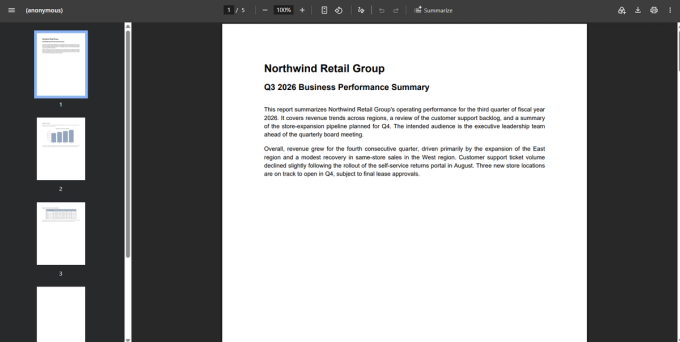
What image-based conversion produces: visually identical to the original — because it is the original, flattened into a picture. Click on any cell and there's no text to select; it's one image object per slide.
What text-extraction conversion produces from the same page:
Notice: the font changed from the PDF's original typeface to a substitute sans-serif, there's no table grid or shading (each number is its own floating text box), and the alignment is close but not exact. This is editable — you can click into "$168,000" and change it — but it's not a PowerPoint table object, and cleaning it up cell-by-cell is real work.
Chart page, converted:
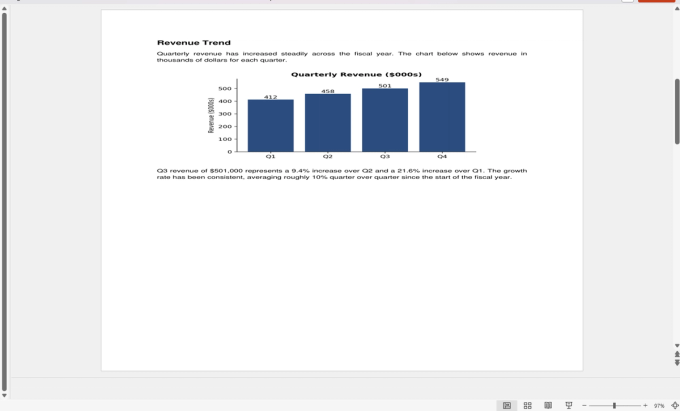
The heading and body paragraph came through as separate, editable text. The chart did not — it's a single flattened image, because a chart in a PDF is drawn graphics, not a live data object. There is no version of PDF-to-PPT conversion, from any vendor, that reconstructs an editable PowerPoint chart from a PDF chart image. That's not a limitation of this tool specifically — it follows from what a PDF chart actually is at the format level.
Two-column page, converted:
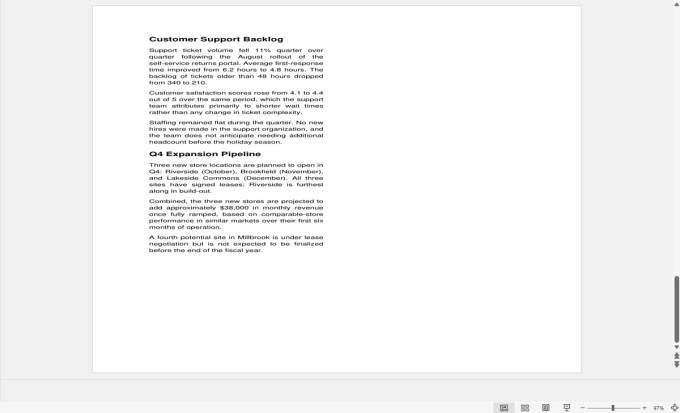
This is the multi-column problem in its most literal form: "Customer Support Backlog" and "Q4 Expansion Pipeline" — two separate column headings in the source — landed overlapping each other. This is a genuine, reproducible failure mode you can trigger yourself with the linked test file, not a hypothetical caveat.
How to Convert a PDF to PowerPoint With PDF Doctor (Free, No Account Required)
Step 1 — Open the tool. Go to pdfsdoctor.com/pdf-to-ppt. No sign-up, no payment, no install. Works in Chrome, Firefox, Safari, and Edge, desktop or mobile.
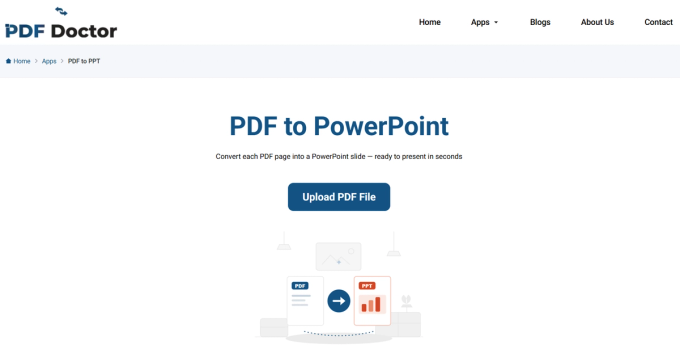
Step 2 — Upload your PDF. Click Upload PDF File. Before you do, decide what you actually need: fully editable content to rearrange into new slides, or just the PDF visible inside PowerPoint for reference during a talk. That answer shapes how you should judge the output. Also check whether your PDF is text-based or scanned — if you can't highlight and copy text in a PDF viewer, it's scanned, and the conversion will produce image-only slides. Run OCR first if you need editable text from a scan.
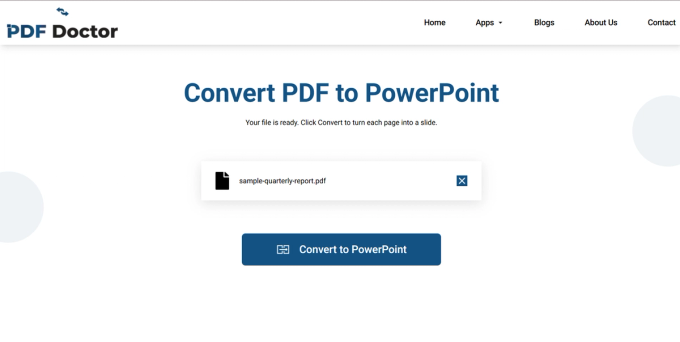
Step 3 — Convert. Once your file is uploaded, click Convert to PowerPoint. Standard documents take a few seconds; large or graphics-heavy files take longer.
Step 4 — Download and review. Once conversion finishes, click Download PowerPoint File, then open the file in PowerPoint, Google Slides, or Keynote.
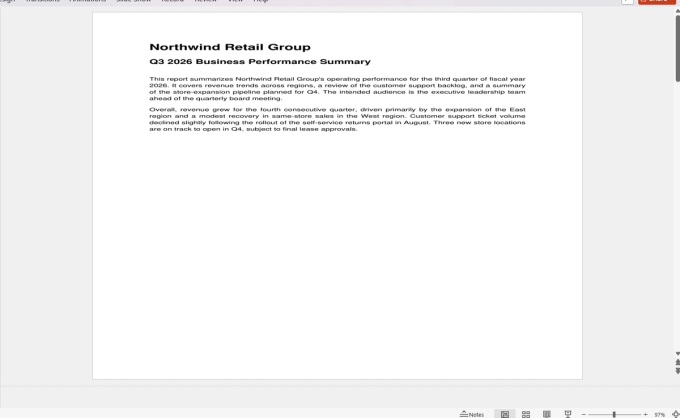
Here's the actual output of that conversion, opened in PowerPoint — the slide panel on the left shows all five converted slides, with the title slide displayed in the main view:
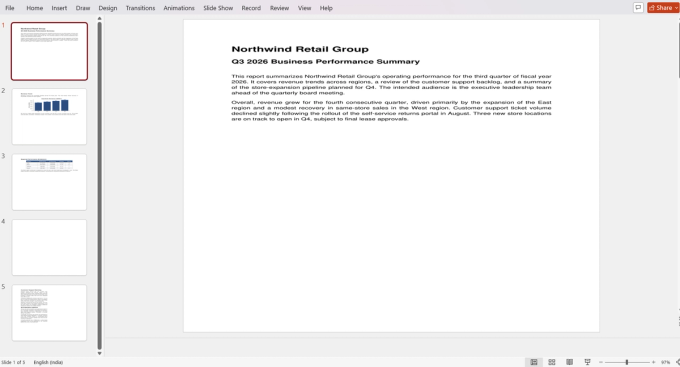
Using our test file as a checklist, verify: is the text actually editable (click into it — can you place a cursor inside, or is the whole slide one flat image)? Does the layout resemble the original PDF closely enough to be useful? Did images and charts come through as separate objects or get baked into a page image? Did fonts render correctly, or get substituted?
A realistic expectation, based on the test conversion above: budget 15–30 minutes of cleanup for a typical document. That's still meaningfully faster than rebuilding a deck from scratch.
A note on privacy. Uploaded files are automatically deleted from PDF Doctor's servers after processing. If you're converting genuinely confidential material — board decks, unreleased product data — and your organization requires files to never leave the machine, a desktop tool that processes entirely offline is the safer choice. For everyday conversions, browser-based processing with automatic deletion is a reasonable trade-off.
What Typically Breaks During Conversion
Confirmed against the test file above and consistent with how PPTX/OOXML structures text, image, and table objects (see the ECMA-376 / ISO 29500 specification referenced earlier):
- Text positioning. Boxes rarely land exactly where they appeared in the PDF. Expect to reposition manually.
- Fonts. A font not installed on your system gets substituted, which changes line breaks and can push content off-slide.
- Charts and graphs. Never reconstructed as live, editable chart objects — always a flattened image or a rough cluster of shapes. Rebuild from source data if you need it editable.
- Tables. Converted as clusters of individually positioned text boxes, not native PowerPoint tables, as shown above. Editing cell-by-cell is tedious; for tables that matter, convert to Excel first and insert as a native table instead.
- Multi-column layouts. As demonstrated above, column order and vertical position frequently get scrambled.
- Backgrounds and decorative elements. Often preserved as separate image layers, adding clutter and file weight.
- Slide structure. One slide per PDF page, always — the tool never intelligently splits a dense page or merges sparse ones. A 30-page report becomes 30 dense slides.
When PDF-to-PPT Conversion Makes Sense
- Reusing report content for a presentation. The most common use case: a status report, research paper, or project summary needs to become meeting slides. Using the test file above as a stand-in for a real report, the realistic path is: convert, delete the slides you don't need, reorganize what's left, and add summary points — a 15–20 minute job for a document this size, versus significantly longer building from a blank deck.
- Presenting a document that started as slides. Lecture notes and training material originally built as slides and exported to PDF convert cleanly, since the dimensions and density already match.
- Extracting visual assets. If you just need the chart or image objects out of a PDF to drop into a deck you're building separately, conversion gets you there.
- Quick reference during a talk. If you don't need editability — you just want the PDF visible inside PowerPoint to flip through — the image-based approach is fine as-is.
When It's the Wrong Approach
- You need a polished deck with zero cleanup. Conversion gives you raw material, not a finished product.
- The PDF is heavily designed (brochures, infographics, marketing collateral). PowerPoint's text-box model can't replicate precise design; use a design tool or rebuild manually.
- You only need a sentence or one image. Converting the whole document is overkill — copy or screenshot directly.
- The PDF is scanned. Run OCR first, or the conversion is image-only with no editable text.
- You need live, editable charts. Rebuild them from source data — no converter, from any vendor, gets around this.
What PDF Doctor's Conversion Does Well — and Where Other Tools Fit Better
Our tool is built for converting text-based PDFs into editable PowerPoint files, quickly, for free, in a browser. Single-column layouts with clear headings and standard images produce the cleanest results — which is exactly what the text-extraction demo above shows.
Where other tools are a better fit: Adobe Acrobat's conversion engine generally preserves more structure on complex layouts than free tools do. LibreOffice Impress is a free, offline option if files can't leave your machine. iLovePDF and Smallpdf handle already-slide-shaped PDFs (lecture decks, exported presentations) well. For building presentations from document content at scale, AI-restructuring tools like Beautiful.ai or Gamma reorganize content into native slide layouts rather than converting page-by-page.
Common Conversion Mistakes and How to Avoid Them
- Expecting a finished presentation. Budget 15–30 minutes of cleanup and you won't be caught off guard by output like the examples above.
- Not checking whether text is editable. Click into text before you start editing — some elements convert as flat images even when most of the slide is editable.
- Ignoring the one-slide-per-page problem. Plan to split, merge, or delete slides to reach a structure that actually works for an audience.
- Leaving substitute fonts in place. Pick one font family and apply it across all slides after conversion — the fastest single fix for a polished look.
- Not converting tables and charts separately. If the data matters, go through Excel and rebuild as native PowerPoint objects rather than editing scattered text boxes or a flattened chart image.
Tips for the Best Results
Assess whether your PDF's layout is closer to slide format (landscape, sparse, clear headings) or document format (portrait, dense, multi-column) before converting — slide-format PDFs convert far better. After conversion, apply one consistent font and theme across all slides. Delete unneeded slides before detailed editing. Extract tables and charts via PDF-to-Excel and rebuild them natively if they need to stay editable. Keep the original PDF open for reference while you clean up.