Converting a PDF to a Word document sounds like it should be seamless — click a button, get an editable file. In practice, it's the least predictable of the common PDF operations. Unlike merging or splitting, which move whole pages around without touching their content, PDF-to-Word conversion has to reverse-engineer the structure of a document that was never designed to be edited. The result can range from near-perfect to barely usable, depending on how the original PDF was built.
How this guide was put together: rather than describe conversion behavior in the abstract, we built three test PDFs representing the layouts people actually run into — a single-column resume, a table-heavy invoice with merged cells, and a scanned document with no text layer — and ran each through PDF Doctor's converter ourselves. Every screenshot below is a real result from those runs, not a mockup. The source files are linked at the end so you can rerun the same test and compare.
What Actually Happens When You Convert a PDF to Word
A PDF stores content as positioned objects on a page — each piece of text, each image, each line sits at exact coordinates. There's no concept of paragraphs, columns, or table cells the way Word understands them. The PDF format (ISO 32000) was designed to preserve exactly how a page looks, not the logical structure behind it — a PDF doesn't "know" that three lines of text form a paragraph, or that a grid of positioned fragments is a table. It only knows where each character sits.
When a conversion tool builds a Word document from a PDF, it has to infer all of that structure: it looks at spacing between text fragments to guess where paragraphs begin, examines aligned blocks of text to try to reconstruct tables, and maps the fonts used in the PDF to the closest available fonts in Word. This is a genuinely hard reverse-engineering problem, and every tool — free or paid — gets it wrong some of the time.
Practical takeaway: simple PDFs with straightforward layouts (single-column text, basic formatting, minimal tables) convert well. Complex PDFs with multi-column layouts, nested tables, custom fonts, or heavy graphic design are more likely to need cleanup afterward. Knowing this in advance lets you evaluate the output realistically rather than assuming the tool failed.
How to Convert a PDF to Word With PDF Doctor (Free, No Account Required)
Step 1: Open the Conversion Tool
Go to pdfsdoctor.com and open the PDF-to-Word tool. No sign-up, no payment, no software install. Works in Chrome, Firefox, Safari, and Edge, on desktop and mobile.
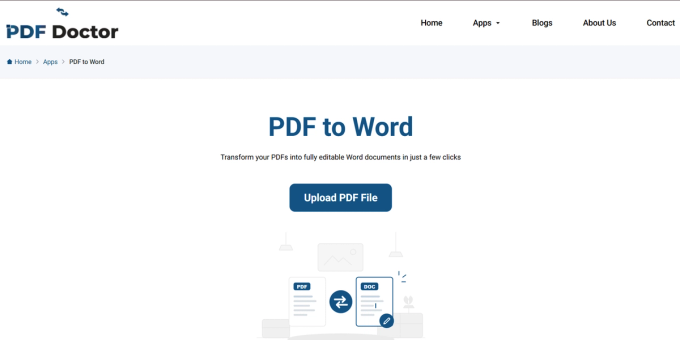
Step 2: Upload Your PDF
Click Upload PDF and select your file.
Before uploading, take a moment to figure out what kind of PDF you're working with — a text-based PDF (made from Word, Google Docs, or similar) or a scanned document (a photograph of a page saved as PDF). This distinction changes everything about the result, and it's covered in detail below.
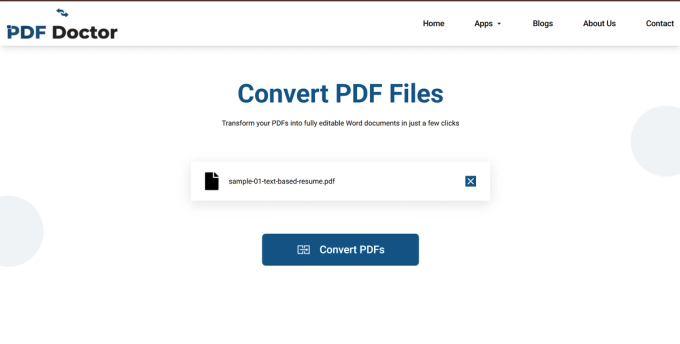
Step 3: Convert the File
Click Convert to Word. For standard files this takes a few seconds; larger or more complex files take longer.
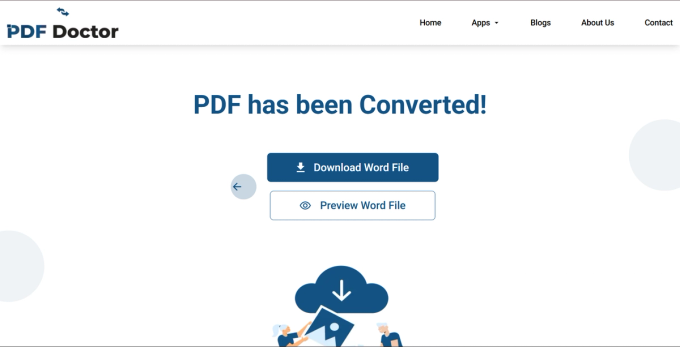
Step 4: Download and Review
Click Download, then — this is the step most people skip — open the file and check it before using it.
Specifically check: table alignment (the most common failure point across conversion tools generally), font rendering (Word substitutes fonts it doesn't have installed), image positioning, and header/footer placement. A five-minute review catches problems that are far more embarrassing to discover after the document has already been sent or submitted.
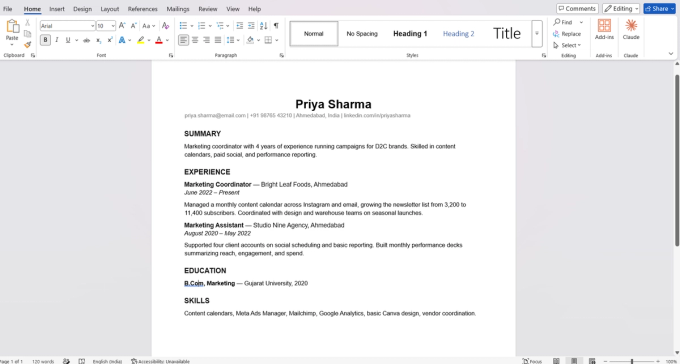
Here's the actual output from our resume test file, opened in Word — headings, spacing, and body text all carried over cleanly:
A Note on Privacy
Uploaded files are automatically deleted from our servers after processing and are not stored or shared. If you're working with highly sensitive material — legal contracts, medical records, financial documents — and your organization requires files to never leave your machine, a desktop tool that processes entirely offline is the safer choice. For everyday conversions, browser-based processing is a practical and secure option.
Scanned PDFs vs. Text-Based PDFs: The Distinction That Matters Most
This is the single biggest source of confusion with PDF-to-Word conversion.
Text-based PDFs are generated by applications like Word, Google Docs, or InDesign. The text is actual character data — a conversion tool can read it, extract it, and place it into a Word document. This is what conversion tools are built for.
Scanned PDFs are effectively photographs of a page saved as a PDF. They may look like they contain text, but the file actually contains an image. Historically, converting a scanned PDF without a separate OCR step produces one of three outcomes: a Word file with just the image (not editable), garbled or missing text, or an empty document.
The quick test: open the PDF and try to select a sentence. If you can highlight individual words, it's text-based and ready to convert. If nothing selects, it's scanned.
To test this properly, we built a deliberately image-only PDF — an affidavit with no embedded text layer at all. You can verify this yourself: running pdftotext against the source file returns nothing.
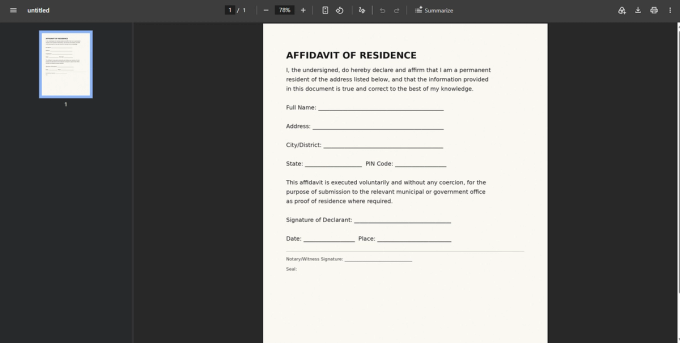
What we expected: an empty or garbled Word file, per the usual warning about scanned PDFs.
What actually happened: it didn't fail. PDF Doctor ran the page through OCR automatically and returned an editable, two-page Word document with the affidavits text intact and correctly matching the source:
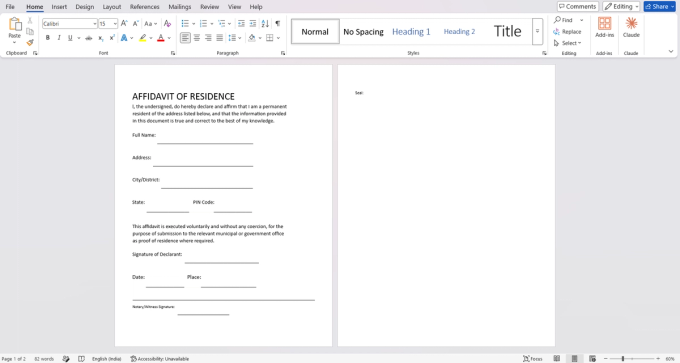
The one imperfection: the content ran onto a second page, with just the "Seal:" line spilling over — a minor spacing fix, not a data-loss problem. This automatic OCR isn't something every free converter does; many still require you to run OCR yourself first (see the fix below for those cases). But it's a genuine capability worth calling out here rather than assuming the worst-case outcome by default.
If your converter doesn't OCR automatically: run the file through a dedicated OCR tool first. Adobe Acrobat, ABBYY FineReader, and the free open-source OCRmyPDF all handle this. Once the PDF has a text layer, conversion results improve substantially.
What Typically Breaks During Conversion
These are the formatting elements most likely to need manual fixing after conversion, based on general conversion behavior across tools plus what we found testing our own.
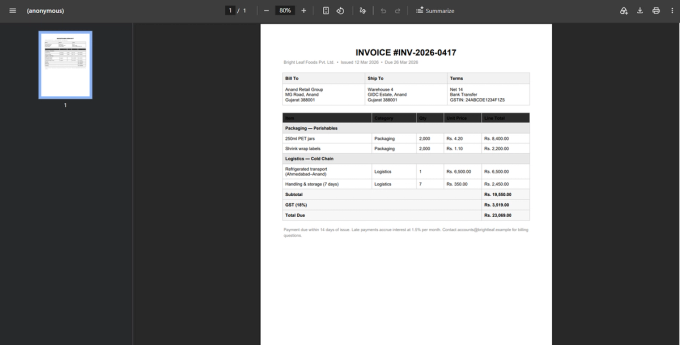
Tables. Industry-wide, this is usually the number one problem area — tables with merged cells, no visible borders, or colored backgrounds are the layouts most likely to break, with columns misaligning or cell content scattering. Our test invoice deliberately included merged header rows spanning multiple columns (the "Packaging — Perishables" and "Logistics — Cold Chain" section headers) to stress-test exactly this.
Source table, with the merged category rows visible:
Result, after conversion:
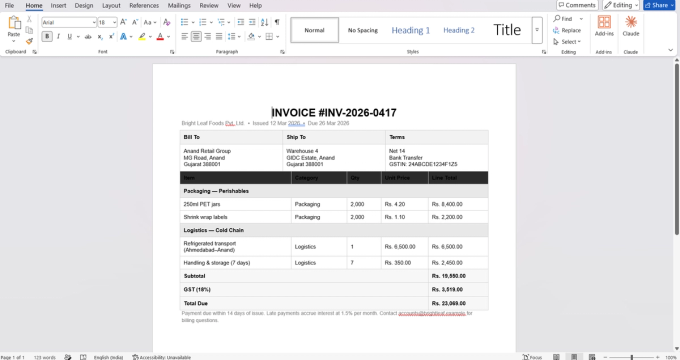
In this case the merged rows, column alignment, and totals all came through correctly. That's not a guarantee for every table — borderless tables and deeply nested tables are still more likely to break — but it's a solid result for a standard merged-cell layout like this one.
Multi-column layouts. PDFs with two or three text columns (newsletters, academic papers, brochures) can convert with columns jumbled together, interleaving text from different columns or stacking them out of order. We haven't published a tested example of this yet — it's on our list to add.
Headers and footers. These sometimes convert as inline body text rather than staying in the header/footer region. Page numbers may end up mid-page or repeated within the body.
Custom and embedded fonts. If the PDF uses a font not available on your system, Word substitutes a different one — which can shift line spacing, text width, and page breaks even when the text itself is correct.
Images and graphics. Images can shift position, resize, or lose quality. Vector graphics in the PDF may not translate cleanly into Word's image format.
Form fields. Interactive PDF fields (checkboxes, text inputs, dropdowns) typically don't survive conversion as Word form fields — they usually appear as static text or disappear.
None of this means conversion is useless — for straightforward documents the output is often clean, and in our own testing both the table and even the scanned document came through better than the general warnings would suggest. But knowing what to check lets you evaluate the result quickly and decide whether it needs manual cleanup.
When PDF-to-Word Conversion Makes Sense
Updating a resume or CV. A common case: someone's only surviving copy of their resume is a PDF, and the original Word file is gone. Converting it back to an editable format lets them update roles and experience without rebuilding the layout from scratch. This is exactly the scenario our resume test file is modeled on — see the actual result above.
Editing a contract or agreement. When a contract arrives as a PDF and specific clauses need revision, converting to Word allows tracked changes before sending it back. Table-heavy contracts may need a quick formatting check afterward — see the table section above.
Extracting content from a report. Pulling specific sections out of a long PDF report is easier once it's in Word, where you can copy, paste, and reorganize with full formatting control.
Correcting a small error in a finished document. A typo, a wrong date, an outdated phone number — small fixes like these are far easier to make in Word than in a PDF editor, especially without access to the original source file.
When PDF-to-Word Is the Wrong Approach
- You only need to fill in form fields — use a PDF form filler instead; converting a form to Word destroys the field structure.
- You need a pixel-perfect copy — conversion always introduces some formatting drift. For a signed legal filing or a published design that must look identical, edit it in a PDF editor or return to the original source file.
- The PDF is heavily designed — brochures, marketing materials, and infographics rely on precise visual positioning that Word's text-flow model can't replicate. Use a design tool like Canva, InDesign, or Figma instead.
- You just need to read or annotate — converting to Word is overkill if you only need to highlight, comment, or sign. Any PDF reader handles that without altering the file.
What PDF Doctor's Conversion Tool Does Well — and Where It Has Limits
We'd rather be direct about fit than have you use our tool for something it wasn't built for.
Built for: converting text-based PDFs with straightforward layouts into editable Word documents, quickly and for free, in a browser. Single-column documents and standard tables convert well, and — based on what we saw testing the affidavit above — scanned documents fare better than the usual warnings suggest, thanks to automatic OCR.
Where other tools are a better fit:
- Complex layouts, higher accuracy: Adobe Acrobat's conversion engine is the industry standard and handles multi-column and heavily nested table documents better than most free tools.
- Free, offline: LibreOffice can open PDFs directly and convert them to editable documents without uploading anywhere.
- Converting at scale, programmatically: developer libraries like pdf2docx (Python) give more control over the conversion pipeline.
Common Conversion Mistakes and How to Avoid Them
- Assuming a scanned PDF will always fail. As shown above, some converters (including this one) OCR automatically. It's still worth checking the result, but don't rule out conversion before you try.
- Expecting a perfect copy. No conversion tool produces a flawless replica of a complex PDF every time. Treat the output as a starting point, and review it.
- Not reviewing the output before sending it. Check tables, fonts, images, and page breaks before you distribute the file — this matters more here than for merging or splitting, because conversion introduces more potential changes.
- Converting when a PDF editor would be simpler. For a one- or two-word fix, editing directly in a PDF editor (even a free one) may be faster than converting, editing, and exporting back.
- Forgetting to re-export as PDF after editing. If the final deliverable needs to be a PDF, use Word's "Save as PDF" or "Export" function afterward — and check the exported PDF to confirm formatting held.
Tips for the Best Results
After conversion, check tables first — they're still the most common failure point across tools generally, even though ours held up well in this test. If fonts look different, check whether the original PDF used custom fonts you don't have installed. Keep the original PDF open alongside the Word file during cleanup so you have a reference. For complex documents, budget a few minutes for manual formatting adjustments — that's normal, not a sign the tool failed.
Wrapping Up
PDF-to-Word conversion is genuinely useful when you need to edit a document that only exists as a PDF. It's also the PDF operation most likely to produce imperfect results, because it requires reconstructing document structure the PDF format was never designed to preserve.
The key to getting good results: check whether your file is scanned or text-based before converting, review the output before using it, and expect some manual cleanup on complex layouts. For straightforward documents — resumes, simple reports, basic contracts — conversion is usually clean, and in our own testing, both the merged-cell table and the scanned document came through better than expected.
The conversion tool used in this guide is available at pdfsdoctor.com.