Short answer: For everyday documents, a reputable online PDF tool is about as safe as emailing the file. Four kinds of documents are different: health records handled by a HIPAA-regulated organisation, privileged legal material, documents under a strict NDA, and government-controlled information. For those, the law or a contract may decide for you, and a local tool is the safer default.
I build and maintain the processing engine and infrastructure behind PDF Doctor's tools. So I spend a lot of time on the question people ask most: "Where does my file actually go?" This guide gives the honest, technical answer, for our tool and for any other.
It covers what happens to a file during an upload and which protections really matter. It explains where the legal lines actually sit, citing the regulators and bar associations that drew them. It also covers two risks most "is it safe?" articles skip: hidden metadata and redaction that doesn't actually redact.
Disclosure: PDF Doctor is our product. We've tried to write the guide we'd want to read about a competitor, including the cases where you shouldn't use us.
Not legal advice: This article explains how the rules generally work. If a regulation or contract governs your documents, check with your compliance team or a lawyer.
What actually happens when you upload a PDF
An upload has five stages. Each one has a different risk, so it helps to separate them.
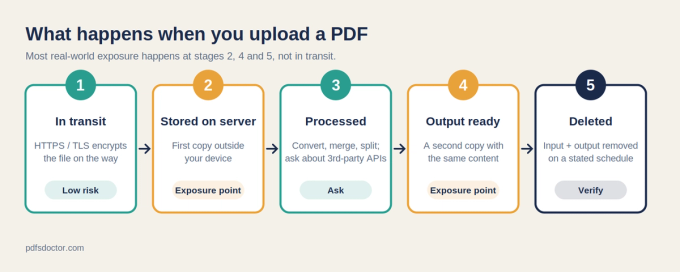
- In transit. Your browser opens an encrypted HTTPS (TLS) connection and sends the file. Someone on the same café Wi-Fi can see that you're talking to the site, but not what's in the file.
- Received and stored. The server writes the file to memory or to disk. This is the first moment a copy of your document exists outside your device.
- Processed. The conversion, merge, split, or repair runs. Some tools send the file to a third-party API at this point, which adds another company that handles your file.
- Output available. A second file now exists: the result. People often forget it, but it holds the same sensitive content as the upload.
- Deleted. Both the input and the output should be removed on a stated schedule, with no copies lingering in logs, caches, or backups.
Most real-world exposure doesn't happen in transit. It happens at stages 2, 4, and 5, when a copy of the file sits somewhere longer than you expected.
The protections that actually matter
1. HTTPS: necessary, but it proves less than you think
If a tool's address starts with http:// instead of https://, don't upload anything. The padlock means your file is encrypted on the way to the server. It does not mean the site is legitimate, because scam and phishing sites get free TLS certificates too. Treat HTTPS as a minimum requirement, not proof of trust.
2. A clear deletion policy
When deletion is described, it usually falls into one of three kinds:
- Deleted right after processing. The best case: the file exists only for seconds or minutes.
- Deleted after a set time (1 hour, 24 hours). Acceptable for most documents.
- Vague or missing. Phrases like "we delete files regularly" give you nothing to hold the company to. Treat this as a red flag.
Also check whether the policy covers output files, not just uploads. Keep in mind that deleting a file normally removes it from use, not from the physical storage media. That's why well-run services rely on encryption and managed cloud storage, following standards like NIST SP 800-88r2, Guidelines for Media Sanitization.
3. Encryption at rest
While your file sits on a server, it should be encrypted on disk. Major cloud platforms do this by default. Google Cloud, for example, encrypts all customer data at rest automatically. This protects against stolen disks, but not against the service itself, which holds the keys.
4. A company you can identify
Look for an About page, named people, and a working contact channel. A company with a name and a reputation has legal and commercial reasons to handle your data responsibly. An anonymous site doesn't.
5. What else runs on the page
Many free PDF sites load ad networks and trackers on the same page where you drop your file. Those scripts normally can't read the document. Still, a page with dozens of third-party scripts has a larger attack surface than a clean one. Your browser's developer tools or a tracker blocker will show you what's loading.
6. AI training and "improving our services"
Read the privacy policy for words like train, model, improve our services, and aggregate. If the policy allows file contents to be used for machine learning, your document may be kept long after the stated deletion window. That's a reason to avoid the tool for anything private.
7. Certifications (for business use)
An independent audit such as SOC 2 Type II or ISO/IEC 27001 means an outside auditor checked the company's security controls. Free consumer tools rarely have these. If your company's policy requires them, that settles the question for you.
8. Processing in your browser: nothing leaves your device
Some tools process the PDF entirely in your browser using JavaScript or WebAssembly, so the file never leaves your computer. To test a tool, open your browser's developer tools, go to the Network tab, run the tool, and see whether a large upload request appears. For very sensitive files, this approach is safer than any server-side policy.
When online PDF tools are fine
- Routine work documents, such as reports, decks, proposals, and invoices you'd email anyway. A reputable tool adds very little risk compared with the same file sitting in a dozen inboxes.
- Public or near-public material, such as published papers, brochures, and filed public records.
- Personal files without identifiers, such as recipes, tickets, and notes.
When the law or a contract may decide for you
Health records (HIPAA, United States)
HIPAA applies to covered entities, like providers, health plans, and clearinghouses, and to their business associates. According to the US Department of Health and Human Services' cloud computing guidance, a covered entity may use a cloud service for electronic health records only if it signs a business associate agreement (BAA) with that provider. Most consumer PDF tools don't offer a BAA.
Who this does not cover: a patient converting their own lab report for personal use is not a HIPAA-regulated party. The law restricts the organisation, not you.
Privileged legal material
The common claim that "uploading equals waiving privilege" goes too far. The American Bar Association's Formal Opinion 477R (PDF) says a lawyer may generally send client information over the internet if they make reasonable efforts to prevent unauthorised access. It also says stronger measures may be required when a client agreement, the law, or the sensitivity of the information calls for them.
In practice, a free tool with no contract, no audit, and no negotiated retention terms is hard to defend as a "reasonable effort" for highly sensitive matters. Lawyers should use a firm-approved local tool or a vendor under contract. Rules differ by jurisdiction, so check your bar's guidance.
Personal data about other people (GDPR, UK GDPR, India's DPDP Act)
These laws usually apply when a business processes personal data, not when you handle your own files at home:
- The EU GDPR, Article 2(2)(c) excludes processing by an individual for a purely personal or household activity. The UK regulator explains that this domestic exclusion applies only when there is no connection to professional or commercial activity.
- India's Digital Personal Data Protection Act, 2023 likewise does not apply to personal data processed by an individual for a personal or domestic purpose (section 3(c)(i)). The Act is being brought into force in phases, with most obligations taking effect in May 2027.
It's different when you upload a file of customer or employee data at work. Your employer is then responsible for that data, and your company's data-protection policy decides which tools you're allowed to use. Many companies require a signed data processing agreement with any service that handles personal data.
Documents under an NDA
Many NDAs ban disclosure to "any third party" without consent. Read the actual clause. Some NDAs exempt service providers bound by confidentiality, but many don't. If you're unsure, treat an online tool as a third party.
Government-controlled information
Classified material, and designations such as Controlled Unclassified Information (CUI) in the US, come with their own handling rules. Those rules rule out consumer web tools.
Identity and financial documents
For passports, national ID scans, tax returns, and statements with full account numbers, the concern usually isn't that the tool will misuse them. Every extra copy is one more place a data breach can reach. Browser-based processing or a local tool is the better default.
Two risks that have nothing to do with the upload
Redaction that doesn't redact
Drawing a black box over text in a PDF hides it on screen. The text itself is usually still there underneath. In 2009, the US Transportation Security Administration posted a "redacted" screening manual online. Readers could recover the hidden sections simply by copying and pasting them. The NSA had already published guidance on this problem, Redacting with Confidence, after similar incidents.
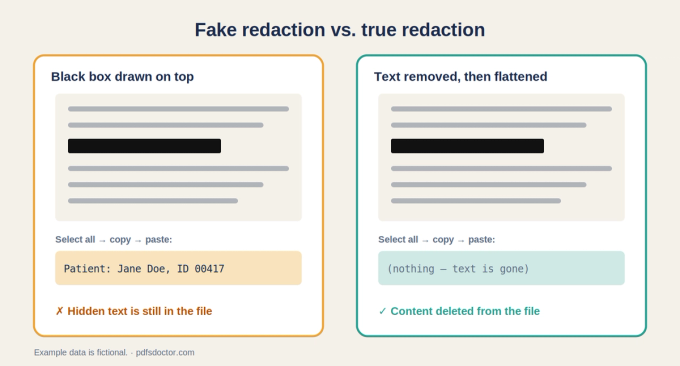
Test it yourself: after redacting, open the PDF, select all (Ctrl/Cmd + A), copy, and paste into a plain-text editor. If the hidden words appear, the redaction failed. Real redaction deletes the text from the file and then flattens or re-renders the page.
Metadata you didn't mean to send
PDFs can carry author names, company names, software versions, earlier revisions, comments, form data, and embedded attachments. Converting a Word file to PDF doesn't reliably remove these. Check File → Properties in your PDF reader before sharing. To produce a clean copy, use your PDF editor's "Remove hidden information" or "Sanitize" feature.
A 60-second check before you upload anything sensitive
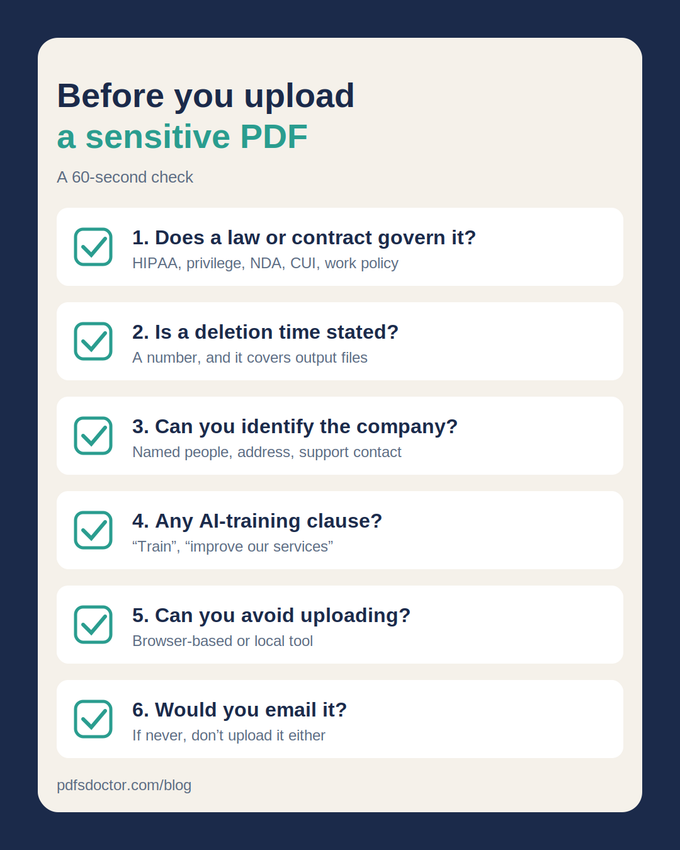
- Does a law or contract govern this file? This includes HIPAA, privilege, an NDA, CUI, or your employer's data policy. If yes, stop and use an approved tool.
- Does the tool state when files are deleted? Check that the policy covers output files too.
- Can you identify the company? Look for an About page, named people, and a real contact channel.
- Does the policy mention training or "improving services"? If file contents can be used for either, skip the tool for private files.
- Can you avoid uploading at all? Try a browser-based tool, or a local app.
- Would you email this file to a colleague? If yes, a reputable online tool carries similar risk. If you'd never email it, don't upload it either.
Decision guide by document type
Marketing material and public reports: Yes, use any reputable online tool. This material is already public, or would cause little harm if exposed.
Everyday work documents, such as decks, proposals, and invoices: Usually fine. The risk is similar to emailing the file. Choose a reputable tool with a clear deletion policy.
Personal ID, tax returns, and bank statements: Use online tools only with caution, because every extra copy adds exposure if there's a breach. A browser-based or local tool is the safer choice.
Customer or employee personal data at work: Use an online tool only if your employer has approved it. Data-protection law applies here, so stick to employer-approved vendors.
Documents under an NDA: Check the clause first, because "third party" may include web tools. If in doubt, use a local tool or get the other party's consent.
Health records at a HIPAA-regulated organisation: No, unless the provider has signed a business associate agreement. HHS requires a BAA for cloud providers that handle this data. Use a vendor that signs one, or a local tool.
Privileged legal material: Generally no. Lawyers must take reasonable, and sometimes heightened, precautions to protect client information. Use a firm-approved local tool.
Classified material or CUI: No. The handling rules forbid consumer tools, so use authorised systems only.
What PDF Doctor does with your files
Here is how our own tools handle your files.
In transit. Every file you upload to PDF Doctor travels over an encrypted HTTPS connection.
Processing. Files are processed on secure Google Cloud infrastructure. Google Cloud encrypts customer data at rest by default.
Deletion. Uploaded files are deleted after processing. We don't keep a library of your documents.
Your content stays yours. We do not read, analyse, or share the content of the files you upload. Our Privacy Policy explains our data handling practices in full.
Where we're not the right tool: PDF Doctor is a free consumer tool. It's a good fit for the everyday documents described above, such as converting a Word document, splitting a report, merging presentation files, or unlocking a password-protected PDF you own. It is not the right choice for health records at a HIPAA-regulated organisation, privileged legal material, or classified information. For those, use a local or contracted tool. We'd rather tell you that directly than have you make a decision based on incomplete information.
The bottom line
Online PDF tools are a reasonable choice for most everyday documents, as long as the tool uses HTTPS, has a clear deletion policy, and is run by a company you can identify. The real restrictions apply to a short, clear list: health records at HIPAA-regulated organisations, privileged legal work, strict NDAs, and government-controlled material. For those documents, and for identity and financial files, the safest upload is one that never happens. Use a browser-based or local tool instead.
Frequently asked questions
Can an online PDF tool see my file? The server has to read the file to process it, so yes, technically. What matters is how long the file is kept, who can access it, and whether its contents are logged or reused.
Is uploading a PDF safer than emailing it? They're roughly comparable. A tool that deletes files right after processing can leave fewer lasting copies than an email thread, which often stays in several mailboxes for years.
Does HTTPS mean a PDF site is safe? No. HTTPS only protects the file while it travels to the server. Check the deletion policy and the company behind the site too.
Can I use an online tool for my own medical records? HIPAA restricts healthcare organisations, not patients handling their own records. It's still sensible to choose a tool with a clear deletion policy.
How do I know if my redaction worked? Copy all the text from the redacted PDF and paste it into a plain-text editor. If the hidden words appear, the redaction didn't work.
About the author
Laay Trivedi is a software developer and data scientist at PDF Doctor. He builds and maintains the PDF processing engine, data pipelines, and infrastructure behind PDF Doctor's tools. Connect on LinkedIn
Sources
- US Department of Health and Human Services, Office for Civil Rights: Guidance on HIPAA & Cloud Computing
- American Bar Association: Formal Opinion 477R, Securing Communication of Protected Client Information (PDF)
- EUR-Lex: Regulation (EU) 2016/679, the General Data Protection Regulation
- UK Information Commissioner's Office: A guide to the data protection exemptions
- Digital Personal Data Protection Act, 2023: Section 3, Application of the Act
- KPMG India: Decoding the Digital Personal Data Protection Act, 2023 (PDF)
- NIST: SP 800-88r2, Guidelines for Media Sanitization
- Google Cloud: Default encryption at rest
- Federation of American Scientists: NSA guidance, Redacting with Confidence
- Nextgov: In wake of TSA breach, a refresher on redacting PDFs