Picking a PDF library looks simple until your app is halfway built. Then you find out the one you chose reads two-column pages in the wrong order, or uses a gigabyte of memory on a long report, or comes with a licence your company can't ship.
At PDFs Doctor we work with PDF files every day, so we wanted real numbers instead of opinions copied from old forum threads. We ran ten popular open-source libraries through the same five tests on the same machine and recorded what happened: speed, memory, accuracy, output size and licence.
This article shares every result, explains how we tested, and tells you which library fits which job.
Key Takeaways
- Fastest text extraction: pypdfium2 (0.20 s) and PyMuPDF (0.21 s) pulled text from a 200-page report more than three times faster than pypdf and about 40 times faster than pdfplumber.
- Reading order matters more than speed: on a two-column layout, five libraries returned text in the correct order. pdfplumber's default text call mixed both columns together and scored 52%.
- Memory surprises: pdfplumber reached 1,059 MB on a 200-page file in a normal loop. Closing each page after use brought it down to 43 MB.
- Merging is fast everywhere: all four merge tools combined 50 files in under 0.2 seconds. pikepdf was quickest, and pdf-lib produced the smallest file.
- Licence can decide for you: PyMuPDF is excellent but uses the AGPL licence (or a paid commercial licence). pypdfium2, pypdf, pdfplumber, pdf-lib and pdf.js use permissive licences.
Why We Ran This Benchmark
PDFs Doctor is a free online PDF tool suite, so questions like "which engine should handle merging?" or "how do we pull clean text from a scanned report?" are part of our everyday work. When we looked for an up-to-date comparison, most of what we found had at least one of these problems:
- It tested library versions that are several years old.
- It measured only speed and ignored accuracy, memory or licensing.
- It didn't say what files were used, so nobody could repeat the test.
So we built our own test files, wrote down every setting, and ran each test several times. Everything below comes from those runs.
The Libraries We Tested
We picked ten widely used open-source projects. Eight are Python packages and two are JavaScript packages that run in Node.js and in the browser.
- pypdf (6.17.0) – A pure-Python library for reading, splitting, merging and editing PDFs. No compiled parts, so it installs anywhere. Licence: BSD-3-Clause.
- pikepdf (10.16.0) – A Python wrapper around qpdf, a mature C++ library for low-level PDF editing and repair. Licence: MPL-2.0.
- PyMuPDF (2.1) – Python bindings for the MuPDF engine. It reads, renders, edits and creates PDFs. Licence: GNU AGPL 3.0 or a paid Artifex commercial licence.
- pypdfium2 (5.13.0) – Python bindings for PDFium, the PDF engine used inside the Google Chrome browser. Licence: Apache-2.0 / BSD-3-Clause.
- pdfplumber (0.11.10) – Built on pdfminer.six and designed for detailed extraction of characters, lines and tables. Licence: MIT.
- pdfminer.six (20260107) – A pure-Python text-extraction library that analyses page layout. Licence: MIT.
- ReportLab (5.0.1) – A long-standing Python toolkit for generating PDFs such as reports and invoices. Licence: BSD.
- fpdf2 (2.9.0) – A simple, pure-Python PDF generator. Licence: LGPL-3.0.
- pdf-lib (1.17.1) – A JavaScript library for creating and editing PDFs in Node.js or the browser. Licence: MIT.
- pdf.js (6.5.438) – Mozilla's PDF engine, used for the built-in PDF viewer in Firefox. We used it for text extraction. Licence: Apache-2.0.
Not every library does every job. pikepdf, for example, can't render pages, and ReportLab can't read existing PDFs. So each test includes only the libraries built for that task.
How We Tested
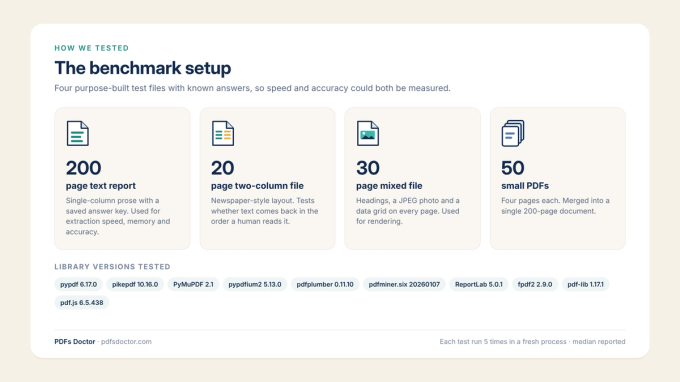
Fair benchmarks need two things: test files with a known correct answer, and identical conditions for every library. Here is exactly what we did.
The Test Files
We generated four sets of PDFs and saved the original text for each one. That saved text acted as an answer key, so we could measure accuracy and not just speed.
- A 200-page text report. Plain single-column prose, about 400 words per page. Used for extraction speed, memory and accuracy.
- A 20-page two-column document. A newspaper-style layout, where the correct reading order is the full left column and then the full right column.
- A 30-page mixed document. Each page has a heading, a paragraph, a colour JPEG photo and a bordered data grid. Used for rendering.
- Fifty small PDFs. Four pages each, merged into one 200-page file.
The Test Machine
- Cloud Linux server with 2 virtual CPUs (Intel Xeon, 2.1 GHz) and 8 GB of RAM
- Python 3.13 for the Python libraries
- Node.js 22 for pdf-lib and pdf.js
The Rules
- Every test ran five times, each time in a brand-new process, so no library could benefit from a warm cache left by another.
- We report the median of the five runs. The fastest and slowest runs stayed close to the median in every test.
- Time covers only the actual work (opening, processing and saving), not the time needed to load the library.
- Memory is the peak memory of the whole process, including Python or Node.js itself. It's the number your server will actually see.
- We used each library's standard, documented method and default settings, the way most developers would on day one.
- Accuracy was calculated by comparing the order of the extracted words with the answer key, page by page.
Benchmark 1: Text Extraction Speed
Text extraction is the most common PDF task for developers. It powers search, data entry automation and, more and more, AI document pipelines.
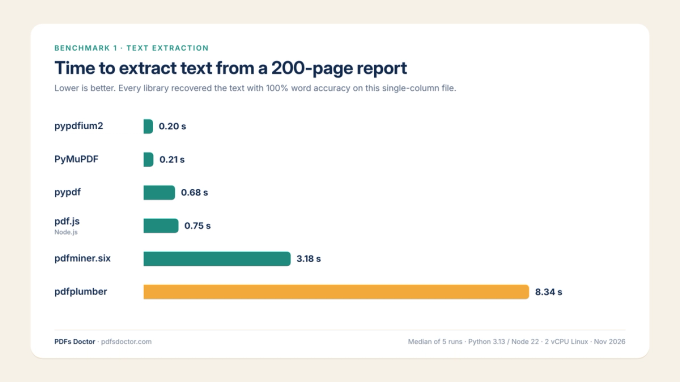
Results for the 200-page report, from fastest to slowest:
- pypdfium2 – 0.20 seconds
- PyMuPDF – 0.21 seconds
- pypdf – 0.68 seconds
- pdf.js (Node.js) – 0.75 seconds
- pdfminer.six – 3.18 seconds
- pdfplumber – 8.34 seconds
Every library recovered 100% of the words in the correct order on this clean, single-column file, so speed is the only real difference here.
What this means: the two libraries built on C or C++ engines, pypdfium2 and PyMuPDF, are in a league of their own. pypdf is the fastest pure-Python option and is still quick enough for most web apps. pdfminer.six and pdfplumber are slower because they analyse every character's exact position on the page. That extra work is what makes them good at tables, but it costs time if all you need is plain text.
Benchmark 1b: Memory Usage
Speed is only half the story on a server. A library that uses too much memory can crash a small container long before it gets slow.
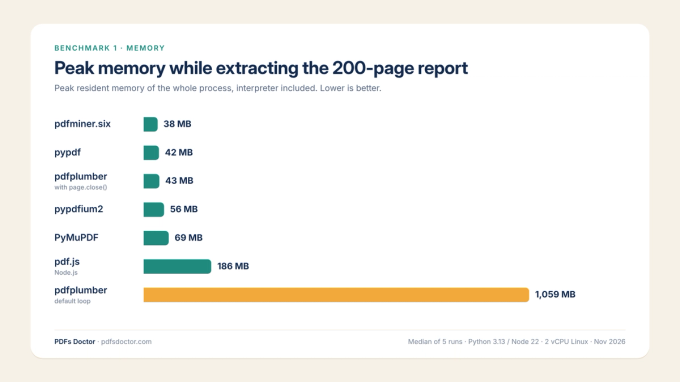
Peak memory while extracting the same 200-page report:
- pdfminer.six – 38 MB
- pypdf – 42 MB
- pdfplumber with page closing – 43 MB
- pypdfium2 – 56 MB
- PyMuPDF – 69 MB
- pdf.js (Node.js) – 186 MB
- pdfplumber, default loop – 1,059 MB
The pdfplumber result is the one to remember. In a normal loop over every page, it keeps the detailed layout data of each page in memory and climbed past one gigabyte. When we called the page's close() method after extracting each page, peak memory dropped to 43 MB. As a bonus, the run also got faster, from 8.3 to about 5.2 seconds. If you use pdfplumber on long documents, close each page when you're done with it.
The pdf.js figure is higher mainly because the Node.js runtime itself uses more baseline memory than Python.
Benchmark 2: Reading Order on Two-Column Pages
Plenty of real documents use columns: research papers, newsletters, brochures, legal notices. If a library reads straight across both columns, the sentences get stitched together into nonsense. This is a quiet bug that rarely throws an error, so it often reaches production.
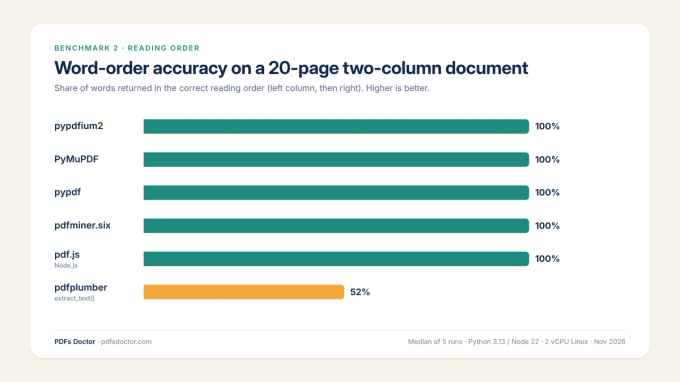
Reading-order accuracy on the 20-page two-column file:
- pypdfium2 – 100%
- PyMuPDF – 100%
- pypdf – 100%
- pdfminer.six – 100%
- pdf.js (Node.js) – 100%
- pdfplumber (default text call) – 52%
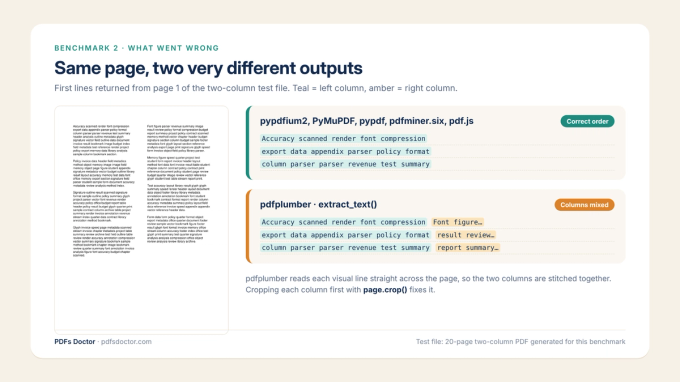
Here is what happened. pdfplumber's extract_text() reads each visual line from the left edge of the page to the right edge. On a two-column page, the first line of the left column was joined to the first line of the right column, and so on down the page. All the words were there, but about half of them were in the wrong place.
This isn't really a flaw. pdfplumber gives you precise control over page regions, and it expects you to use it. When we cropped each page into a left half and a right half with page.crop() and extracted each half separately, accuracy went up to 100%.
Lesson: always test a library on documents that look like your real files, not just on simple single-column samples.
Benchmark 3: Merging 50 PDFs
Merging is one of the most-used tools on PDFs Doctor, so this test mattered to us. Each library combined 50 four-page files into a single 200-page PDF.
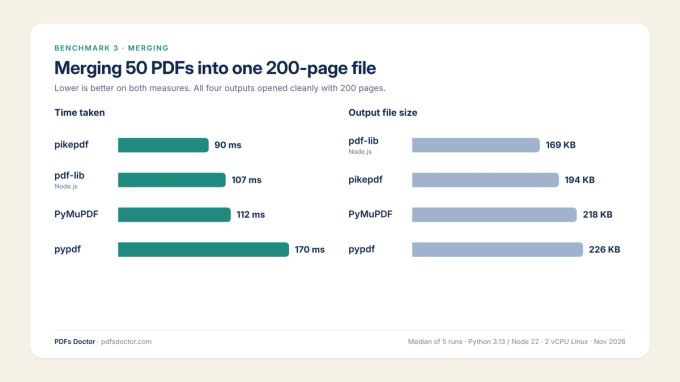
Time taken:
- pikepdf – 90 milliseconds
- pdf-lib (Node.js) – 107 milliseconds
- PyMuPDF – 112 milliseconds
- pypdf – 170 milliseconds
Size of the merged file:
- pdf-lib – 169 KB
- pikepdf – 194 KB
- PyMuPDF – 218 KB
- pypdf – 226 KB
All four outputs opened correctly and contained exactly 200 pages. The speed gap is small enough that users of a web app would never notice it.
The size difference is more interesting. By default, pdf-lib packs the PDF's internal objects into compressed groups called object streams, which makes the file smaller. The other libraries can produce smaller files too, but you have to turn on their compression or object-stream settings yourself. If file size matters to you, and for email attachments it usually does, check those options before you choose.
Benchmark 4: Rendering Pages to Images
Rendering turns a PDF page into a picture. It's what you need for thumbnails, page previews and preparing scanned pages for OCR.
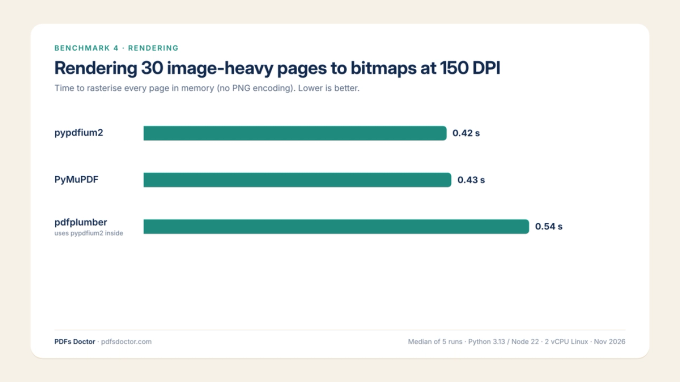
Time to render all 30 pages of the mixed document at 150 DPI:
- pypdfium2 – 0.42 seconds
- PyMuPDF – 0.43 seconds
- pdfplumber – 0.54 seconds
pypdfium2 and PyMuPDF finished in a near tie, at roughly 70 pages per second on a modest 2-CPU machine. pdfplumber does its rendering with pypdfium2 behind the scenes, so it produces the same picture, plus a small amount of extra work on top.
We measured only the rendering itself, not saving the images as PNG files, because image saving depends on separate image libraries and would blur the comparison.
Benchmark 5: Creating PDFs From Scratch
Generating invoices, certificates and reports is the other big category of PDF work. Each library wrote the same 600 paragraphs into a new 100-page PDF.
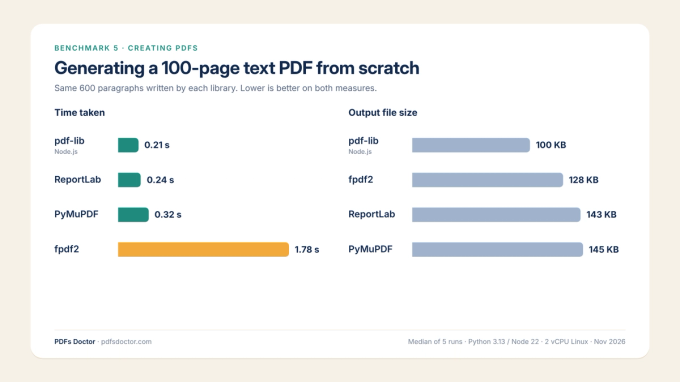
Time taken:
- pdf-lib (Node.js) – 0.21 seconds
- ReportLab – 0.24 seconds
- PyMuPDF – 0.32 seconds
- fpdf2 – 1.78 seconds
Output size:
- pdf-lib – 100 KB
- fpdf2 – 128 KB
- ReportLab – 143 KB
- PyMuPDF – 145 KB
Raw speed isn't the whole picture for generation. In our test, ReportLab and fpdf2 handled paragraph spacing and line wrapping on their own. pdf-lib wrapped lines but treated the document as one long block of text, with no gaps between paragraphs, so you would need to add your own layout logic for anything beyond simple pages. ReportLab gives you the most complete layout system, including flowing text, tables and automatic page breaks, which explains why it is still the default choice for report generation in Python.
fpdf2 was the slowest here, but 1.8 seconds for 100 pages is still fine for most invoice or certificate jobs. Its strength is a very small, friendly API with no compiled parts to install.
Licensing: The Factor That Can Overrule Every Benchmark
A library can win every test and still be the wrong choice if its licence doesn't match how you plan to ship your product. Here is how the ten libraries group (this is general information, not legal advice):
- Permissive licences (MIT, BSD, Apache-2.0): pypdf, pypdfium2, pdfplumber, pdfminer.six, ReportLab's open-source toolkit, pdf-lib and pdf.js. You can generally use these in closed-source and commercial products, as long as you keep the copyright notices.
- Weak copyleft (MPL-2.0, LGPL-3.0): pikepdf and fpdf2. You can use them in commercial products, but changes you make to the library itself usually have to be shared under the same licence.
- Strong copyleft (AGPL-3.0) or commercial: PyMuPDF. The AGPL requires you to release your own application's source code if users interact with it, even over a network, such as through a web service. If you can't do that, Artifex sells a commercial licence.
For a public web tool like a PDF converter, this point alone often decides between PyMuPDF and pypdfium2, since their speeds were nearly identical in our tests.
Which PDF Library Should You Choose?
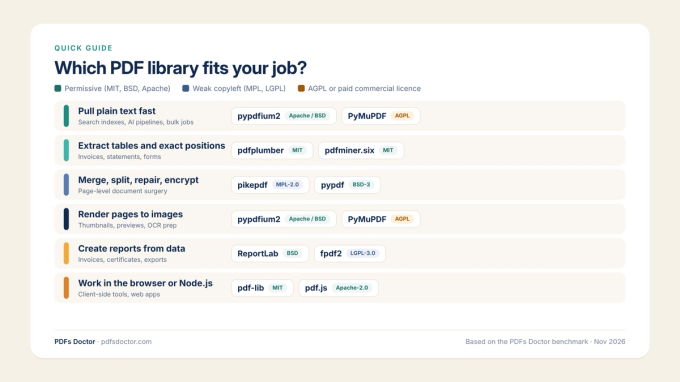
Based on our results, here is what we would pick for each job:
- Fast plain-text extraction (search, AI pipelines, bulk jobs): pypdfium2 if you need a permissive licence. PyMuPDF if AGPL works for you or you buy a licence, since it also gives you a very rich editing toolkit.
- Tables, invoices and exact word positions: pdfplumber. Close each page after use on long files, and crop multi-column pages into regions.
- Merge, split, rotate, encrypt or repair: pikepdf for speed and its ability to handle damaged files through qpdf. pypdf if you want zero compiled dependencies, for example on restricted hosting.
- Thumbnails and previews: pypdfium2 or PyMuPDF. Both are fast and accurate.
- Generating reports, invoices and certificates in Python: ReportLab for complex layouts. fpdf2 for simple documents and an easy learning curve.
- Browser-based or Node.js tools: pdf-lib to create and edit, pdf.js to view and extract text. Both run fully on the user's device, which also keeps files private.
Limitations of This Benchmark
No benchmark covers every case, so here is what ours didn't test:
- Our test files were generated, not collected from the wild. That gave us an accurate answer key, but real-world PDFs can include broken fonts, scanned pages and unusual encodings that may change the rankings.
- We didn't test OCR. None of these libraries reads text from scanned images on their own. That needs a separate OCR engine such as Tesseract.
- Table extraction accuracy wasn't scored. We only measured reading order for running text.
- One machine, one operating system. Absolute times will differ on your hardware. The ranking between libraries is the more useful takeaway.
- Default settings only. Most of these libraries have tuning options that can change both speed and output size.
Frequently Asked Questions
What is the fastest open-source PDF library for Python?
In our tests, pypdfium2 and PyMuPDF were the fastest for both text extraction and rendering. They finished within a few hundredths of a second of each other on a 200-page document. The best choice between them usually comes down to licensing.
Is pypdf good enough for production?
Yes, for most tasks. It extracted text from 200 pages in under 0.7 seconds with perfect accuracy on our test files, and it merged 50 files in 0.17 seconds. Its biggest advantage is that it's pure Python, so it installs anywhere without compiled dependencies.
Why is pdfplumber slower than other libraries?
pdfplumber collects detailed information about every character, line and rectangle on the page. That data is what makes it excellent at table extraction, but it takes more time and memory than simple text extraction.
Can I use PyMuPDF in a commercial product?
Yes, but under conditions. PyMuPDF is released under the AGPL-3.0, which requires you to share your application's source code, including for software offered over a network. Otherwise, you need a commercial licence from Artifex, the company behind MuPDF.
Which JavaScript PDF library should I use?
For creating and editing PDFs, pdf-lib is the most popular pure-JavaScript option and produced the smallest files in our tests. For displaying PDFs or reading their text, pdf.js from Mozilla is the standard choice and returned correct reading order on our two-column test.
Final Thoughts
There is no single "best" PDF library, but there is usually a best one for your task. Our benchmark showed that the biggest differences are rarely about raw speed. They are about reading order on complex layouts, memory on long documents, and the licence attached to the code.
Before you commit, test your top two picks on a handful of your own real documents. It takes an hour and can save weeks of rework later.
If you just need to merge, compress, split or convert a PDF without writing any code, you can do it in your browser with the free tools on PDFs Doctor.
Sources and References
- pypdf documentation and source code – https://github.com/py-pdf/pypdf
- pikepdf documentation and source code – https://github.com/pikepdf/pikepdf
- qpdf, the engine behind pikepdf – https://github.com/qpdf/qpdf
- PyMuPDF source code – https://github.com/pymupdf/PyMuPDF
- Artifex licensing information for MuPDF and PyMuPDF – https://artifex.com/licensing
- pypdfium2 source code – https://github.com/pypdfium2-team/pypdfium2
- PDFium project – https://pdfium.googlesource.com/pdfium/
- pdfplumber source code – https://github.com/jsvine/pdfplumber
- pdfminer.six source code – https://github.com/pdfminer/pdfminer.six
- ReportLab open-source toolkit – https://www.reportlab.com/opensource/
- fpdf2 source code – https://github.com/py-pdf/fpdf2
- pdf-lib source code – https://github.com/Hopding/pdf-lib
- pdf.js by Mozilla – https://github.com/mozilla/pdf.js
- ISO 32000-2, the PDF 2.0 standard – https://www.iso.org/standard/75839.html