Every week, a new AI tool promises to "chat with your documents." You upload a file, ask a question, and get an answer in seconds. It is easy to look at that and wonder whether the file itself still matters. If an AI can read, summarise, rewrite and reformat anything on demand, why would anyone keep sending fixed-layout PDF files around?
I think about this question more than most students my age, because I spend a lot of my time outside class working on PDFs Doctor, a free online suite of PDF tools for merging, splitting, converting, compressing, editing and securing files. Building those tools means looking closely at how PDFs are structured and how people actually use them. My honest answer to the title question is no, AI will not replace the PDF, but it will change what the PDF is for. This article explains why, using the published standards and documented product changes rather than hype.
Key takeaways
- The PDF solves a problem AI does not: it keeps a document looking the same, and saying the same thing, on every device for decades.
- AI is changing how we read and create documents, not how we record and prove them.
- The PDF has kept evolving for more than 30 years, and its open ISO standards make it unusually future-proof.
- The biggest shift is that well-structured, tagged PDFs will matter more, because both screen readers and AI tools depend on that structure.
- For everyday users, the practical move is to make PDFs that are clean, searchable and accessible, so they work well for humans and machines alike.
What problem was the PDF built to solve?
To understand whether something can be replaced, it helps to know why it exists in the first place.
In 1991, Adobe co-founder John Warnock wrote an internal paper describing what he called the Camelot Project. His goal was simple to state and hard to achieve: let anyone capture a document from any application, send it electronically, and view and print it on any machine with the same result. That idea became the Portable Document Format, which Adobe launched alongside Acrobat in 1993.
The core promise of a PDF is fidelity. Fonts, layout, images and page breaks stay exactly where the author put them. A PDF invoice opened on a phone in Ahmedabad looks the same as it does on a laptop in Berlin. That sounds ordinary today, but it is the reason PDFs became the default format for contracts, research papers, government forms, bank statements, academic transcripts and product manuals.
Keep that word, fidelity, in mind. It is the key to the whole question.
How the PDF has kept evolving
A common assumption is that the PDF is an old, frozen format. The record shows the opposite. It has been updated repeatedly to meet new needs.
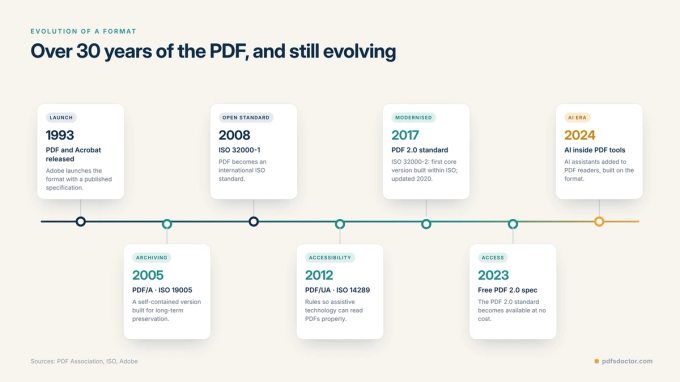
The PDF has been extended many times since 1993, which is a big part of why it has outlasted so many other file formats.
Here are the milestones that matter most for this discussion:
- 1993, PDF and Acrobat launch. Adobe releases the format and publishes its specification so others can build compatible software.
- 2005, PDF/A (ISO 19005-1). A version of PDF designed for long-term archiving. It requires documents to be self-contained, for example by embedding fonts, so they can still be rendered correctly far into the future.
- 2008, ISO 32000-1. Adobe hands the PDF specification to the International Organization for Standardization, turning it into an open international standard rather than a single company's format.
- 2012, PDF/UA (ISO 14289-1). A standard focused on universal accessibility, so that people using assistive technology such as screen readers can navigate PDF content properly.
- 2017 and 2020, PDF 2.0 (ISO 32000-2). The first version of the core standard developed fully within ISO, later updated in 2020.
- 2023, no-cost access to PDF 2.0. The PDF Association announced that the ISO 32000-2 standard could be downloaded free of charge, thanks to industry sponsorship. This lowers the barrier for anyone building PDF software.
- 2024, AI assistants arrive inside PDF readers. Adobe made its Acrobat AI Assistant generally available in April 2024, adding features such as summaries and question answering directly within PDF workflows.
That last point is worth pausing on. The first major wave of AI document tools did not try to kill the PDF. It was built on top of the PDF.
What AI is actually good at with documents
To be fair to the question, AI has already changed how many people handle documents. Large language models are genuinely useful for several tasks:
- Summarising long files. Turning a 60-page report into a one-page brief.
- Answering questions about content. Finding a specific clause, date or figure without reading every page.
- Drafting and rewriting. Producing a first draft of a letter, a report section or a set of notes.
- Extracting data. Pulling names, amounts and dates out of invoices or forms.
- Translating. Giving a quick understanding of a document written in another language.
- Reformatting. Converting the same content into slides, emails or bullet lists.
In other words, AI is excellent at the reading and creating parts of document work. That is where the "AI will replace PDFs" idea comes from. If an AI can generate whatever view you need, the fixed file can seem unnecessary.
What AI cannot replace: the four jobs of a PDF
The problem with that argument is that a PDF is not mainly a reading format. It is a recording format. When a document matters, people need it to do four jobs that AI-generated content cannot do on its own.
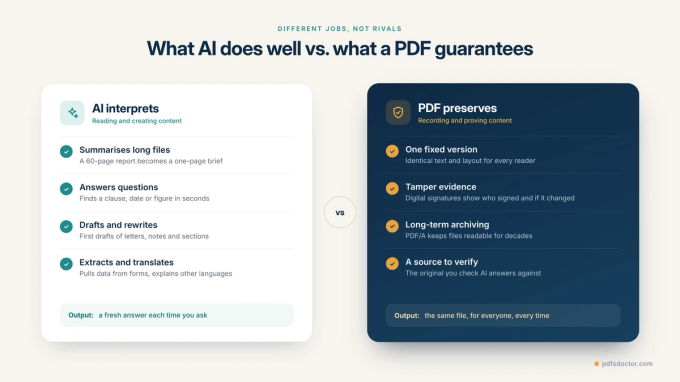
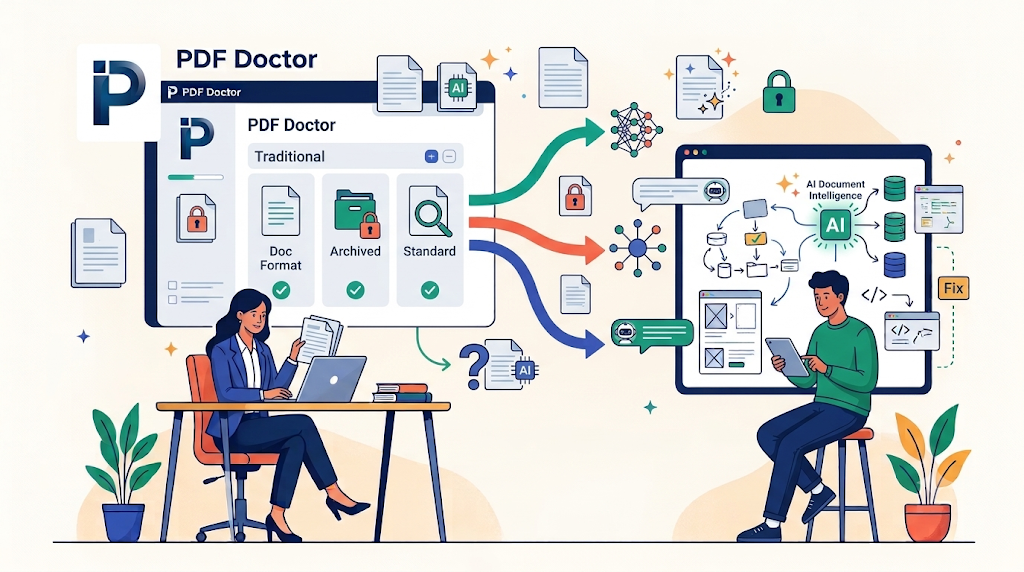
AI and PDFs are good at different things. One interprets content; the other preserves it.
1.A fixed, shared version of the truth
When two parties sign an agreement, they need to point at the exact same text. An AI summary is, by design, a new piece of content generated on request. Ask the same question twice and the wording can change. That is useful for understanding, but it is not acceptable as a record. A PDF is the same file for everyone who opens it, every time.
2.Proof that nothing has changed
PDF supports digital signatures that can show who signed a document and whether it has been altered since. In Europe, the PAdES standards published by ETSI define how advanced electronic signatures work inside PDF files. This kind of tamper evidence is the foundation of contracts, certificates and official records. A chatbot's answer has no equivalent.
3.Long-term preservation
PDF/A exists so that a document saved today can still be opened and rendered correctly decades from now. Archives, courts and universities rely on this. AI models, by contrast, change constantly. The model that produced an answer this year may not exist in a few years, and its output cannot be reproduced exactly.
4.Accountability and accuracy
AI tools can make mistakes, including stating things confidently that are not in the source. That is why responsible AI document tools point back to the original pages. The original document is what you check the AI against. If the source disappears, there is nothing left to verify.
Put simply, AI is a lens, and the PDF is the thing you look at through it. You can improve the lens as much as you like, but you still need something stable to look at.
So what will actually change?
Saying "the PDF is safe" would be too simple. The role of the PDF is shifting in some clear ways.
PDFs become the source, not the interface
More people will interact with documents through an AI layer: asking questions, getting summaries, generating action lists. The PDF will increasingly sit underneath as the trusted source. You might never scroll through a 200-page manual again, but the manual will still exist as a PDF that the AI reads from and links back to.
Structure will matter more than ever
This is the change I find most interesting from a tool-building point of view. A PDF can be made in two very different ways. It can be a "flat" file where text is just shapes on a page, or a "tagged" file where headings, paragraphs, lists, tables and reading order are clearly marked in the background.
Tagged PDFs were originally pushed for accessibility, so that screen readers could read content in the right order. It turns out AI tools benefit from exactly the same thing. When a PDF has clear structure, both a screen reader and an AI can tell a heading from a footnote, follow a two-column layout correctly and understand what a table means. Scanned images with no text layer and badly converted files are where AI tools most often get confused.
Regulation is pushing in the same direction. The European Accessibility Act began applying in June 2025, which raises the importance of accessible digital documents for businesses serving the EU market. Accessible documents and AI-readable documents turn out to be largely the same thing.
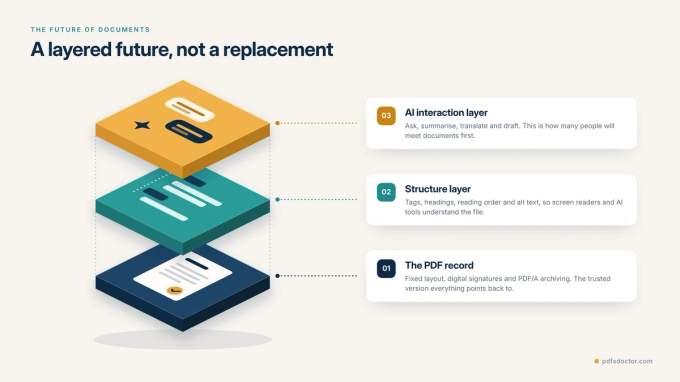
The likely future is layered: the PDF stays as the trusted record, structure makes it understandable, and AI becomes the way many people interact with it.
Creation gets faster, but finalising still matters
AI will draft more and more of the content that ends up in documents. But the moment a document needs to be sent, signed, filed or archived, people will still "freeze" it into a fixed format. The workflow becomes: draft with AI, review as a human, finalise as a PDF.
Hybrid documents will grow
PDF already supports features like attached files, form fields and embedded metadata. In practice, this means one PDF can carry both a human-readable page and machine-readable data. For example, some electronic invoicing formats in Europe embed structured invoice data inside a PDF/A file, so a person sees a normal invoice while software reads the data directly. Expect more of this "one file, two audiences" approach.
What about other formats replacing PDF?
AI is not the only challenger people mention. Web pages, collaborative cloud documents and editable office files are all widely used, and for good reason. They are better than PDF for live collaboration and for content that changes often.
But each of them depends on something that can change: a website can be edited or taken offline, a shared cloud document depends on an account and a service, and an editable file can look different depending on the software that opens it. That is why, even in organisations that work almost entirely in the cloud, the final approved version of a policy, a contract or a report is very often exported to PDF. The formats complement each other rather than compete.
My perspective as a student and a tool builder
I want to be transparent about where my view comes from. I am a second-year engineering student, not a standards committee member or an AI researcher. My experience comes from two places.
As a student, I deal with PDFs constantly: lab manuals, question papers, research papers, university notices and submission formats. I also use AI tools to understand dense material faster. In my own work, AI has never replaced the source PDF. It has made me read it differently. I ask questions first, then go to the exact page to check the answer before I rely on it.
On the PDFs Doctor side, the everyday tasks people come to us for are still very practical: combining files, reducing file size, converting between formats, and protecting documents. Those needs come from the same place the PDF came from in 1993: people need to send a finished document that looks right and stays the same. AI does not remove those needs. If anything, it adds a new one: making sure the PDF is clean and readable enough for an AI tool to understand it correctly.
How to make your PDFs ready for an AI-heavy future
The good news is that you do not need to change formats. You just need to make better PDFs. These habits help humans, screen readers and AI tools at the same time.
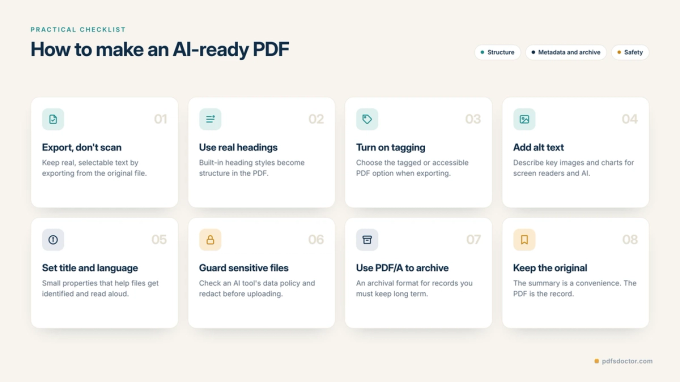
Small habits when creating PDFs make them easier for both people and AI tools to read accurately.
- Export from the original file instead of scanning. A PDF exported from a word processor keeps real, selectable text. A scanned page is just a picture unless text recognition (OCR) is added.
- Use real headings and lists in your source document. Built-in heading styles become structure in the PDF. Bold text that only looks like a heading does not.
- Turn on tagging or accessibility options when exporting. Most modern word processors offer an option to create a tagged or accessible PDF.
- Add alternative text to important images and charts. This helps screen reader users and gives AI tools context they cannot get from pixels alone.
- Fill in the document title and language. These small properties improve how the file is identified and read aloud.
- Keep sensitive files under your control. Before uploading a confidential document to any AI service, check how that service stores and uses uploaded data. Remove or redact information that does not need to be shared.
- Use PDF/A for anything you need to keep long term. Records, certificates and final reports benefit from an archival format.
- Keep the original PDF even after AI summarises it. The summary is a convenience. The PDF is the record you can verify against.
Frequently asked questions
Will AI make PDF files obsolete?
Not in the foreseeable future. AI changes how people read and create content, but PDFs serve a different purpose: keeping a fixed, verifiable, long-lasting version of a document. Those needs are growing, not shrinking, as more content is generated automatically.
Can AI read any PDF accurately?
Not always. AI tools work best with PDFs that contain real text and clear structure. Scanned pages without OCR, complex multi-column layouts and untagged tables can lead to misread or missing information. Always check important answers against the original page.
Is it safe to upload PDFs to AI tools?
It depends on the tool and the document. Read the service's privacy policy, especially how long files are kept and whether they are used for training. For confidential documents, share only what is necessary and redact sensitive details first.
What is a tagged PDF, and why does it matter for AI?
A tagged PDF contains hidden structure that marks headings, paragraphs, lists, tables and reading order. It was designed for accessibility, but it also helps AI tools understand the document correctly instead of guessing from the visual layout.
Will new AI-native document formats appear?
New formats and approaches will certainly be tried, especially for content that changes frequently. But any replacement for the PDF would need to match decades of compatibility, open ISO standards, archival versions, signature support and accessibility rules. That is a very high bar, which is why AI is currently being built into PDF workflows rather than replacing them.
Conclusion
The question "Will AI replace the PDF?" assumes the two are doing the same job. They are not. AI is becoming the way we explore, summarise and draft documents. The PDF remains the way we fix, share, sign and preserve them.
The more content AI generates, the more valuable a stable, trustworthy version of a document becomes. So the future of documents is not AI or PDF. It is AI working on top of better PDFs: structured, accessible, searchable and verifiable. If you make your files that way today, they will be ready for whatever tools come next.
References
- PDF Association, "About the Portable Document Format": https://www.pdfa.org/the-portable-document-format/
- PDF Association, "Announcing no-cost access to ISO 32000-2 (PDF 2.0)": https://pdfa.org/announcing-no-cost-access-to-iso-32000-2-pdf-2-0/
- PDF Association, "ISO 32000-2:2020 is now available": https://www.pdfa.org/iso-32000-22020-is-now-available
- PDF Association, "Index of PDF-related ISO publications": https://www.pdfa.org/index-of-pdf-related-iso-publications/
- Library of Congress, Sustainability of Digital Formats (PDF/A family): https://www.loc.gov/preservation/digital/formats/fdd/fdd000532.shtml
- Adobe Blog, "Adobe transforms PDF experiences with General Availability of Acrobat AI Assistant" (April 15, 2024): https://blog.adobe.com/en/publish/2024/04/15/adobe-transforms-pdf-experiences-with-general-availability-acrobat-ai-assistant
- Wikipedia, "History of PDF": https://en.wikipedia.org/wiki/History_of_PDF